

Among the different music streaming services ruling the roost, YouTube Music and Spotify have been the two capable services that are battling for supremacy. While both offer vast libraries and innovative features, a crucial question often surfaces for discerning listeners: which one delivers superior sound quality? We considered conducting a YouTube music vs. Spotify sound quality comparison to help analyze the best experiences for our specific needs.
Sound Quality Comparison – YouTube Music vs Spotify
We will check out the sound quality of YouTube Music and Spotify based on multiple factors that define the music and its parameters.
1. Audio bitrate and codec comparison
Audio bitrate and codec comparison are the prime features that would decide the sound quality. Audio bitrate refers to the amount of data transmitted per second. This is a metric that defines the detail and fidelity of the audio. Higher bitrates provide a better sound quality.
A codec refers to a program that compresses and decompresses digital audio codec. Each codec has different efficiencies. That would mean some codecs can offer a better audio quality even at a lower bitrate.
Now, coming to YouTube Music and Spotify, here is what you get:
|
Streaming Service |
Plan |
Maximum Bitrate |
Codec(s) Used |
Notes |
|---|---|---|---|---|
|
Spotify |
Premium |
24-bit/44.1 kHz |
FLAC |
High efficiency and excellent sound quality |
|
Free |
160 kbps |
Ogg Vorbis |
Still decent quality for casual listening | |
|
YouTube Music |
Premium |
256 kbps |
AAC / Opus |
Opus is efficient; AAC is widely adopted |
|
Free |
128 kbps |
AAC / Opus |
Lower bitrate, noticeable drop in quality compared to Premium plans |
Tip: Spotify now documents multiple quality tiers across devices, including Very High (~320 kbit/s) and a Lossless tier (up to 24-bit/44.1kHz FLAC) in supported contexts, while the web player uses AAC 128k/256k depending on plan.
2. Listening Experience: Subjective Sound Quality and Loudness
Listening experience refers to the actual feel that you get with the music. Well, that should be a subjective experience and may considerably differ from person to person. The best option for understanding these parameters would be to check the user feedback on platforms like Reddit, Quora, and dedicated audio forums.
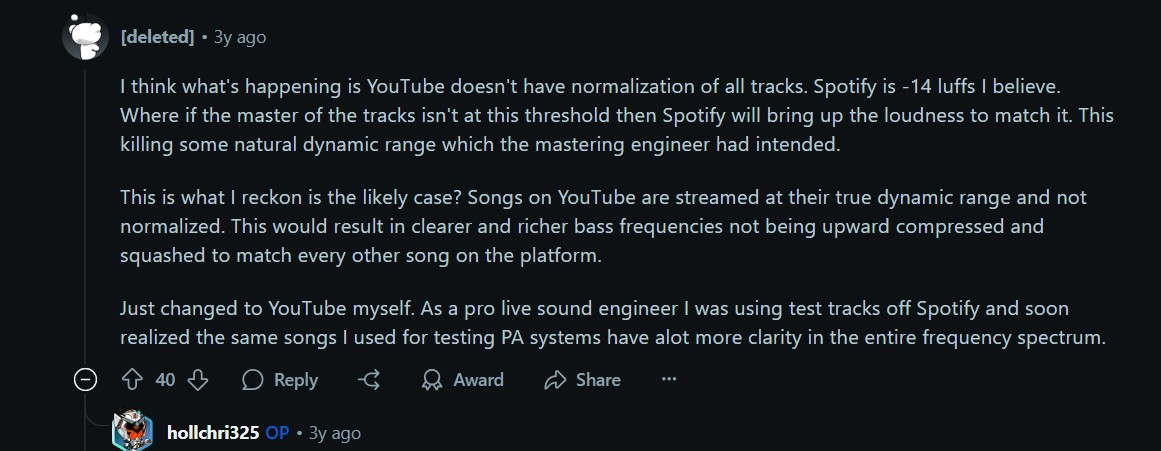
- Spotify: Users generally describe the listening experience as natural, balanced, and consistent. Most of the users suggest that the soundstage especially in the mid range and treble frequencies. It appears more true to the original recording.
- YouTube Music: It comes with a louder and punchier base. However, the extra oomph you experience may seem to be at the cost of clarity and details. Users on Reddit and other forums claim that the listening experience makes the voice appear a bit hyped.
Experts believe that this is typically due to volume normalisation. Both these services use different normalisation options, thus making the experience differ considerably.
- Spotify: The streaming service normalises the audio to -14 LUFS (Loudness Units Full Scale). This is generally considered a more conservative approach, allowing for greater dynamic range in the music.
- YouTube Music: The service normalises the audio to a louder target. It uses -7 LUFS for its music content. While this ensures a consistently loud playback, it can sometimes lead to more aggressive compression, potentially reducing the music's dynamic range and leading to the "louder but less detailed" perception.
3. Audio Equipment Impact: Does Your Gear Make a Difference?
Obviously. The quality of your audio equipment will decide the output and the impact you get.
- If you are a casual listener and are using standard Bluetooth earbuds, basic earphones, or typical smartphone speakers, the audio impact would be quite negligible.
- However, if you are an audiophile, or listening with high-quality headphones, studio monitors, or dedicated home audio systems, you will find a discernible difference. They are more likely to detect compression artifacts, subtle loss of detail, or differences in the soundstage that might be imperceptible on less revealing equipment.
4. Offline Listening & Streaming Quality Settings: Control and Consistency
Both services provide the option to control streaming and download audio quality. However, they follow a different approach when they do it.
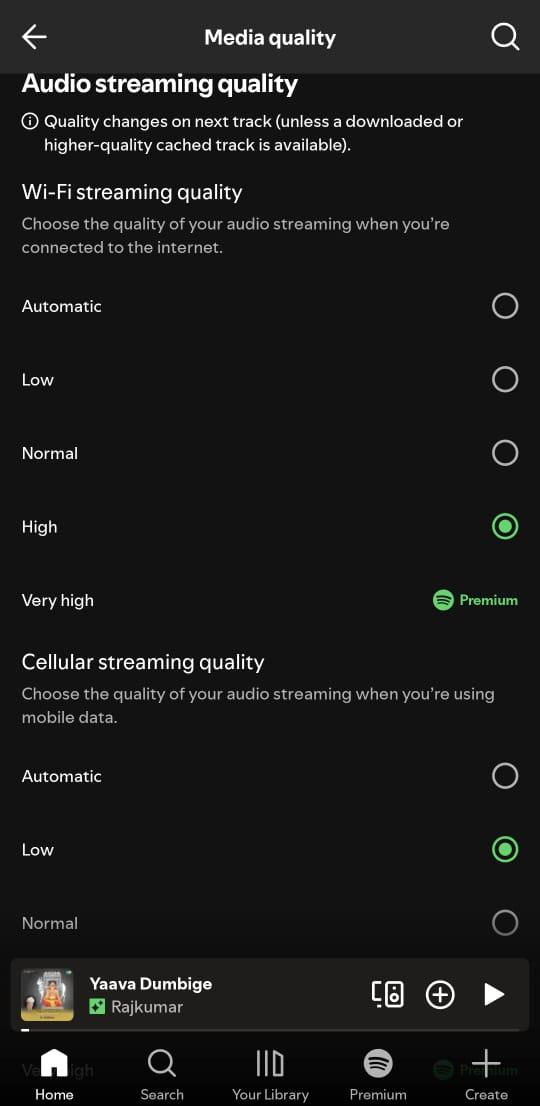
- Spotify: You get a granular level of control over the quality. You can choose from among Low, Normal, High, and Very High. You can thus adjust the audio fidelity in tune with specific preferences you may have.
- YouTube Music: It offers a more generalised and fewer settings for streaming and downloading audio quality. You can check out the options: Low, Normal, High, and Always High conditions. It lacks the fine-tuning that Spotify offers you.
A common question also arises regarding offline listening: does the quality differ between downloaded tracks and streamed content? Generally, the downloaded quality should mirror the selected streaming quality, ensuring a consistent experience whether you're online or off. However, the specific implementation and potential re-encoding processes by each service can subtly affect the final downloaded file.
While both services offer offline listening, for users who desire maximum control over their downloaded audio quality and want to keep their tracks permanently, even after their subscription ends, tools like MusicFab, a music downloader, can be invaluable. It allows you to download songs from Spotify or YouTube Music in high-quality studio sound, with batch download capabilities for efficiency, ensuring you have your favorite music accessible anytime, anywhere. You can save the desired music to any device and listen to it anywhere without limits. It supports MP3, FLAC, WAV, and many popular formats up to 320 kbps.
5. Future Developments: The Quest for Hi-Fi & Lossless Audio
Well, the future holds a better prospect for the audiophiles in terms of audio quality.
- Spotify has already announced its Spotify HiFi service, but it has been delayed due to some internal issues. It is, however, expected to launch sometime this year. provide CD-quality lossless audio, potentially at 16-bit/44.1 kHz, and possibly even higher resolutions. If this comes true, that should be a dream come true for the audiophiles.
- YouTube has not announced any such plans. They seem to be focused more on integrating more video content and enhancing discovery features.
This puts Spotify in a strong position to appeal to sound-quality purists once their HiFi tier materializes.
Broader Ecosystem & Feature Comparison
Apart from the music quality comparison, we also thought of comparing the two music streaming services from a broader perspective.
User Interface and Streaming Experience: Aesthetics and Functionality
Well, your experience with the music streaming service also depends on the interface you get.
- Spotify: You get a truly modern and sleek interface. The consistent user interface further makes it stand out as the best choice. The Spotify Connect feature is what further makes it a standout tool. That should offer a perfect cross-platform and cross-device performance.
- YouTube Music: The streaming service is deeply integrated with the broader YouTube ecosystem. However, you may feel it a bit clunky on a desktop. The mobile experience is generally smoother, but the UI can still feel a bit less refined compared to Spotify's polished offering.
Music Discovery, Algorithm & Personalization: Finding Your Next Favorite Song
The personalised recommendations should be another prime feature on a music streaming service.
- Spotify: It comes with the industry-leading music discovery service. It offers options like Discover Weekly, Release Radar, etc, for finding your music of your liking. You can also get access to meticulously curated personalized radio stations and daily mixes.
- YouTube Music: It offers you vast video history and user behavior data to power its algorithm. It seamlessly integrates official music releases with live performances, covers, and remixes found on the main YouTube platform.
Music Library & Content Variety: Beyond the Albums
You should also look for options like the volume and diversity of content for your specific needs.
- Spotify: It offers you a vast licensed catalog of millions of songs, albums, and an ever-growing library of podcasts. It has always focused on the studio recordings as part of its ecosystem.
- YouTube Music: It offers a unique content variety, thanks to the integration with the vast YouTube library. You get an extensive collection of remixes, live performances, fan-uploaded covers, and even obscure, unofficial tracks that you won't find anywhere else.
The choice of options available on the platform is largely dependent on the content consumption style of the users. If you're all about official studio tracks and podcasts, Spotify is a strong contender. If you crave the visual aspect of music and enjoy delving into a wider, less curated array of content, YouTube Music has the edge.
Pricing & Bundles: Value for Money
In terms of pricing, both services offer you cost-effective pricing options.
Spotify and YouTube Music come with similar pricing options. There are specific plans available for individuals, families, and students.
YouTube Music offers you a value proposition when it is bundled with YouTube. A YouTube Premium subscription not only includes YouTube Music Premium (ad-free listening, offline downloads, background play) but also provides ad-free video viewing across the entire YouTube platform.
Conclusion
The choice between Spotify and YouTube Music ultimately boils down to your individual priorities and listening habits.
You can choose Spotify if:
- You need a pristine overall sound quality
- You are looking for the best music discovery service
- You are fond of podcasts
You would want to go with YouTube Music if:
- You love music videos, live performances, and unofficial uploads
- You are already a subscriber to YouTube Premium
- You are fond of louder and bass-centred music.
FAQ
What’s YouTube Music’s highest quality setting?
On mobile downloads, “High” is listed as 256kbps using AAC/Opus.

![10 Best YouTube to WAV Converters 2025 [Safe & Fast]](https://c.musicfab.org/uploads/images/2024-07/17206996344468865-25133daf28c92d3ac9abe86a67fddcf8.)
