
If you’re experiencing issues with Viwizard Spotify Music Converter, there are several troubleshooting steps you can take. Common problems include connection issues, software glitches, and licensing problems. Solutions include reinstalling the Spotify and Viwizard apps, clearing cache files, ensuring Viwizard is licensed to your computer, freeing up local storage, and using a stable internet connection. As an alternative, MusicFab Spotify Converter offers robust features like multiple output formats, batch downloads, and DRM-free downloads, making it a strong contender for Spotify content conversion.
When it comes to downloading Spotify titles and playlists, Viwizard is one of the most widely used tools. It is known for its excellent capacity to help you download content from Spotify. However, there are times when you may find the Viwizard Spotify music converter not working. Is it possible to fix the errors that you may come across when using the tool?
Yes. There are a few fixes that can be useful and practical when you find Viwizard not working for you. Let us find a few of these fixes and get your Viwizard back in action.
Common ViWizard Issues
Several ViWizard users report these issues that can interrupt their Spotify conversion workflow:
- Spotify app recognition failures
- Conversion errors and timeout issues
- Audio quality inconsistencies
- License verification problems
- Slow conversion speeds
Why is Viwizard Spotify Music Converter Not Working
There can be several reasons that may make Viwizard to stop working. To begin with, the Viwizard Spotify music converter is designed to work with a robust internet connection. A lack of a faster internet connection may leave your tool unable to convert the Spotify tracks and playlists.
It is also possible that you do not have a licensed version of Viwizard that is tied to your computer. In such a case, the tool will not be able to download or convert the videos from the streaming service. Depending on what is causing the issue for you, it may be a good idea to apply the relevant fixes.
Troubleshooting for Viwizard Not Working
Uninstall and Reinstall the Spotify App
You can consider uninstalling the Spotify app on your computer and then reinstall it. Reinstalling a tool can help you get rid of the glitches associated with any tool.
If your Spotify app has any playback issues, reinstalling it can help you resolve those issues. You can also check if the Spotify app version on your device is up-to-date. If not, you can check from within the app and update it to the latest version.
Clean the Cache Files in the Spotify App
Accumulated cache files can interfere with ViWizard's ability to interface with Spotify. Clear these files regularly:
Here is how you can delete the cache files on your device:
- For Mac users: Navigate to ~/Library/Application Support/Spotify/ and delete cache folders. The specific file names may vary in newer Spotify versions.
- For Windows users, open C:\Users*USERNAME\AppData\Roaming\Spotify\Users\username-user* and locate the local-files.bnk file to delete.
Once done, restart your computer and check if Spotify begins to work once again.
Reinstall Viwizard
It is quite possible that the Viwizard app itself may have a few issues. In such a case, it may be practical to uninstall and then reinstall the Viwizard tool on your computer.
In fact, there are times when the app installation files might have developed a few glitches. That is when you can uninstall the Viwizard app on your computer and then reinstall it. When reinstalling the app, make sure to download it from the official source.
Verify License and Accessibility Permissions
It is possible that Viwizard is not licensed to your device. This can cause it to stop working. This can be a quite common case with Mac users. If the app is not licensed to your Mac device, it will stop working as expected.
To check if your Viwizard app is licensed to your Mac device, follow the path System Preferences -> Security and Privacy -> Accessibility. Check if you can find ViWizard here. If not, add it to the accessibility feature.
Free Space from Local Storage
Another reason that can prevent the Viwizard tool from accessing Spotify and converting the titles from here can be the storage issues on your computer. If the storage space on your computer is dwindling, it can make your Viwizard app stop working.
Free up the storage space on your computer by transferring the content to an external storage. This should help you get rid of the error faced on Viwizard.
Use a Stable and Fast Internet Connection
Viwizard needs a stable and faster internet connection to work efficiently in downloading and converting titles from Spotify. If your internet connection is not fast enough, you may end up facing issues with your downloads.
You can check out the higher plan to help you get better and faster speeds. If your current ISP does not have the relevant plans, you can consider changing your ISP.
Contact support
If every option here fails, it may be a good idea to get in touch with the support service on Viwizard. The service has good and reliable customer support. They should be able to help you fix the issues and get the system back in action right away.
Best Alternative to Viwizard – MusicFab Spotify Converter
If you find it difficult to get Viwizard working, we would recommend checking out the best alternatives for the purpose. In this context, MusicFab Spotify Converter is an excellent option to help you achieve an excellent degree of performance.

- Save Spotify music as MP3, FLAC, WAV, M4A or OPUS format.
- Download Spotify songs/playlists/albums/podcasts in batch
- Remove Spotify ads for free users.
- Save Subtitles as External SRT Files.
MusicFab Spotify Converter is one of the excellent and powerful downloaders and converter for all your favorite Spotify titles. It lets you download your videos seamlessly without hassles whatsoever.

MusicFab Spotify Converter Features:
- You can convert the Spotify content in multiple formats which include MP3, WAV, FLAC, and OPUS formats. You can also explore the output quality which includes 128 kbps to 320 kbps, 44.1 kHz sampling rate.
- Batch download options for Spotify Music Playlists, Podcasts & Audiobooks
- It lets you save the song lyrics and also assists you keep the ID3 tags.
- Download and enjoy the downloaded titles on any device without the hassles of DRM protection.
How to save the Spotify titles using MusicFab Spotify Converter?
The steps involved in how to save the Spotify titles using MusicFab Spotify Converter include
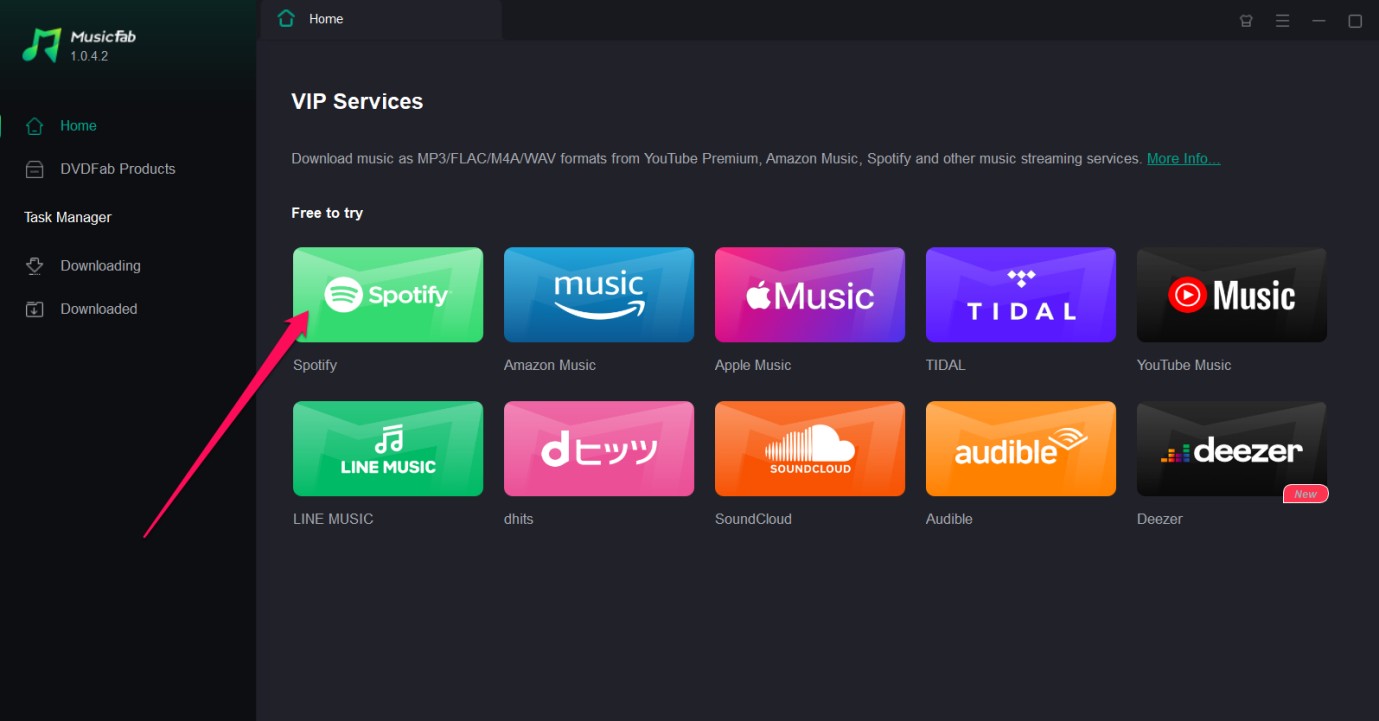
Choose Spotify
From the list of supported services, select Spotify. Log in to your account, or, if you don’t have one, you can create one as needed.
Play the song you wish to download
Search and play the song that you wish to download. Click on the download icon.
Download the title
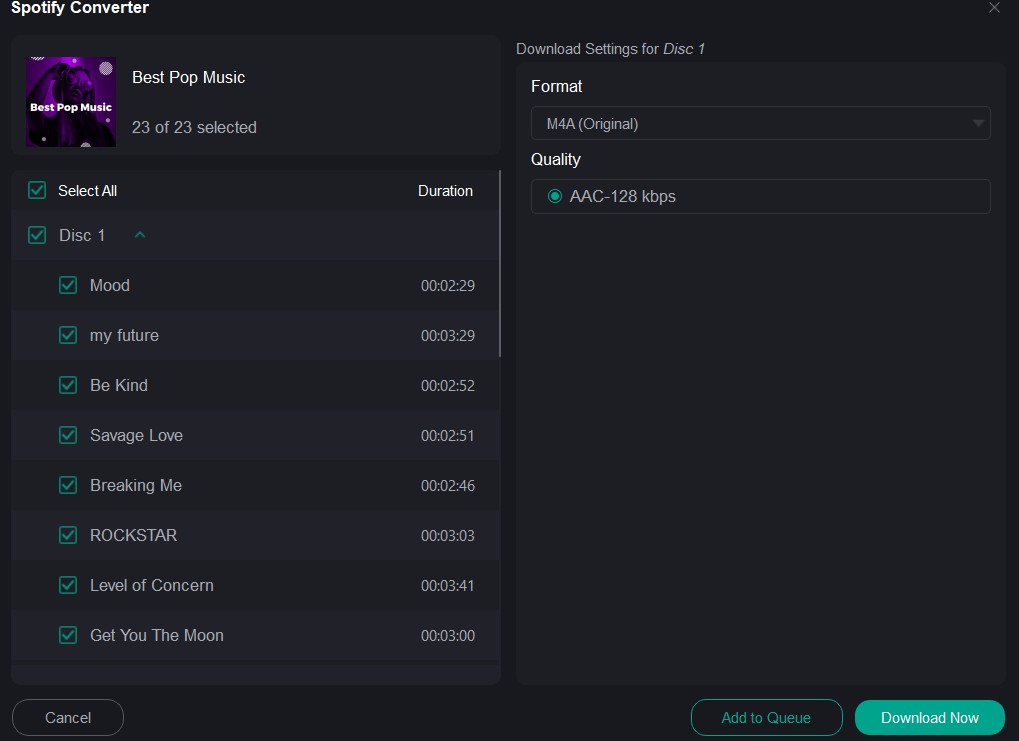
Clicking on the download icon will bring up the download configuration settings. Make your settings and click on Download Now. That should do it and your song will be downloaded easily enough.
Conclusion
Well, Viwizard is a powerful tool for converting and downloading your favorite Spotify titles. However, there are times when the tool may stop working. In such a case, the fixes outlined here should prove to be very handy in fixing the issue of the Viwizard music converter not working.
If you find it difficult to fix the issues on Viwizard for any reason, you can choose to go with the MusicFab Spotify Converter. It should be your prime choice for downloading and converting your favorite Spotify titles.

![10 Best YouTube to WAV Converters 2025 [Safe & Fast]](https://c.musicfab.org/uploads/images/2024-07/17206996344468865-25133daf28c92d3ac9abe86a67fddcf8.)
