

If you’re encountering issues with the NoteBurner Spotify Music Converter, such as error codes, DRM problems, or poor audio quality, there are several fixes you can try. These include restarting your device, reinstalling or updating the software, freeing up local storage, and ensuring you have a stable internet connection. If these solutions don’t work, considering an alternative like MusicFab Spotify Converter could be beneficial. MusicFab offers features such as multiple format support, batch conversion, and ID3 tag retention.
The NoteBurner Spotify Music Converter is definitely an excellent option for downloading the Spotify tracks and converting them to any format of your preference. However, there are times when you may come across a situation where you will find the NoteBurner Spotify music converter not working.
How to solve the issue of NoteBurner not working? Let's find out the best options to fix the issue more effectively.
Common NoteBurner Issues in 2026
- Failed -1, Failed -1001, Failed 1009 errors
- Spotify app recognition failures
- Conversion process interruptions
- Audio quality degradation
- DRM detection issues
Why is NoteBurner Spotify Music Converter Not Working?
There can be several different reasons that may make NoteBurner Spotify Music Converter stop working. Some of these errors would include Failed-1, Failed-1001, and Failed 1009. Finding the exact causes of these errors and applying the relevant fixes can help you take care of your Spotify music downloads and conversions.
Some other issues that you may come across when using the NoeBurner converter include:
- NoteBurner Not Recognizing Spotify
- Failed to Convert Songs
- Error Codes and Messages
- DRM-Related Issues
- Audio Quality Problems
How to Fix NoteBurner Spotify Music Converter Not Working?
Depending upon what is causing the issue for you, it may be very easy to apply the relevant fixes. Let us check out the best fixes that can help you address NoteBurner not working.
Restart your device
Most of the time, restarting your device can help you fix most of the software glitches. When a PC runs for a long time, it may collect a large amount of cache files. These cache files may prove to be too much and the system begins to have issues.
Restart your device and launch NoteBurner to check if the issue has been resolved. You can move to the next fix if it is not solved.
Reinstall NoteBurner
Your NoteBurner Music Converter itself might have developed a few issues. You can consider uninstalling the app and then reinstalling it.
Make sure to download the latest version of the software from the official website. NoteBurner not working can be due to the older or outdated version of the software. The right option should be to uninstall the older version and reinstall the latest version.
Update NoteBurner to the latest version
If you do not wish to uninstall and then reinstall the NoteBurner Music converter, you can check if the tool has an update. Updating to the latest version of the software can help you address the issue of NoteBurner not working.
Check the appropriate section from within the software and check if your tool has any updates pending. If you find an update, make sure to download and install it.
Free up storage from the local storage
The downloaded files on NoteBurner are saved to your local storage. If the local storage gets full, you may end up with NoteBurner Spotify Music Converter errors. Make sure to free up some of the storage on your device and check it resolves the issue for you.
You can transfer some of the downloaded files to an external storage so that your local storage is free for more videos and audio files.
Contact Support
If none of those fixes help you solve the NoteBurner not working issues, contacting support may be the only solution. The service is known for a robust customer support in place and they should be able to help you fix any of the issues that may be troubling your installation.
Best Alternative to NoteBurner Spotify Music Converter: MusicFab
If none of the above fixes do not solve the issue for you, the only best option should be to look for the alternatives to NoteBurner Spotify Music Converter. Of course, you will find a host of downloader options for the right alternative to NoteBurner, but we found MusicFab Spotify Converter to be an exciting and powerful tool for practically every need that you may have.

- Save Spotify music as MP3, FLAC, WAV, M4A or OPUS format.
- Download Spotify songs/playlists/albums/podcasts in batch
- Remove Spotify ads for free users.
MusicFab Spotify Converter helps the users to convert any tune on Spotify to their preferred audio format. The faster download speed and the retention of ID3 tags make the tool stand out as an excellent choice for almost all your download needs.

Top features of MusicFab Spotify Converter:
Support for multiple formats: Download and convert Spotify titles to multiple formats such as MP3, WAV, FLAC, and OPUS formats.
- Batch conversion capability: The music converter can convert multiple tracks simultaneously. This will include Music Playlists, Podcasts & Audiobooks
- Retention of the ID3 tags: The downloader retains the song lyrics and other ID3 tags intact.
- Works with any Spotify plan: You can use it with practically any Spotify plan that you are on. That should be a blessing for the Spotify users on the free plan.
How to use MusicFab Spotify Converter to download your Spotify music?
The steps are extremely easy and simple to follow. You do not need any sort of technical expertise. Nor does the tool come with any steep learning curve.
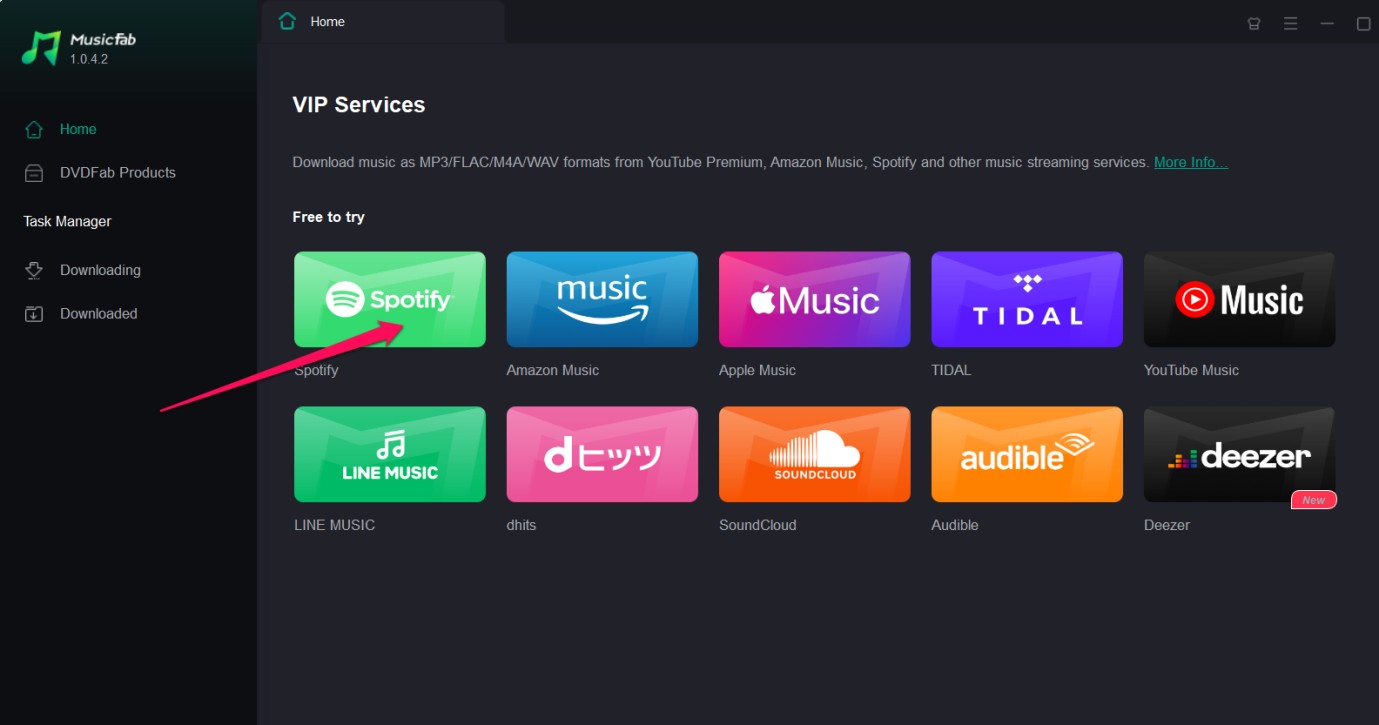
Choose Spotify
From among the available services, choose Spotify. Sign in to your Spotify account. You can even create an account if you do not have one.
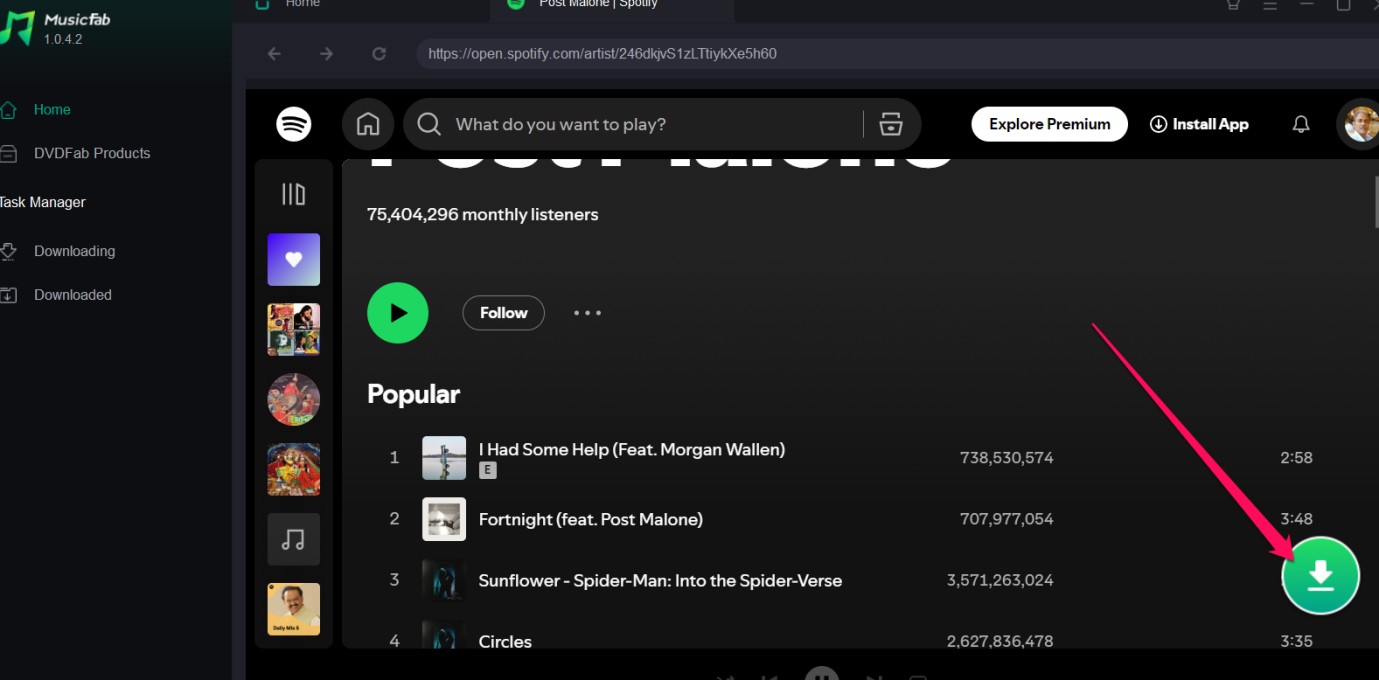
Search and play the song you wish to download
Search for the Spotify track, Podcast, or Audiobook that you wish to download. Click on the Download arrow to begin downloading your track.
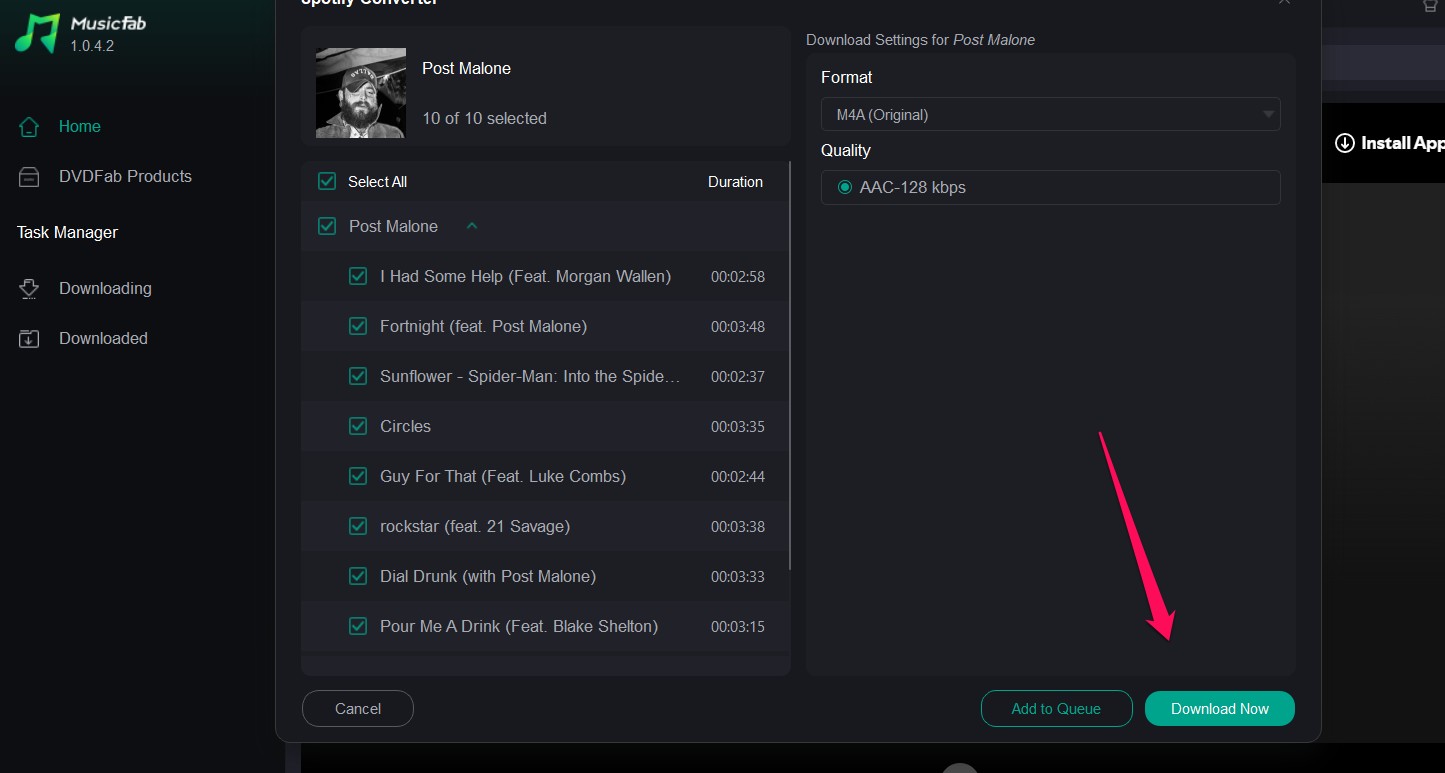
Configure your download settings and download
The tool will come with a pop-up with the download configurations. Check your download preferences and configure them. Click on Download Now to start downloading your track or audiobook.
Conclusion
Finding the NoteBurner Spotify Music Converter not working can be a tough task. However, we assume that the fixes that we have featured here should help you fix the issues comfortably and get back your NoteBurner Converter back in action.
However, if you are facing frequent issues with your NoteBurner tool, it may be worthwhile to check for an alternative. In our view, MusicFab Spotify Converter should be an excellent option that should provide you with a complete solution for NoteBurner not working for Spotify.

![10 Best YouTube to WAV Converters 2025 [Safe & Fast]](https://c.musicfab.org/uploads/images/2024-07/17206996344468865-25133daf28c92d3ac9abe86a67fddcf8.)
