

Get to know different methods of listenning Amazon muisc offline, this guide will walk you through the officlal and third-party ways.
Is It Possible To Enjoy Amazon Music Offline?
Often, users post questions like “Can I listen to Amazon Music offline?” Yes, Premium users of Amazon Music can enjoy their preferred tracks offline. However, there are multiple limitations to using this default download option.
All the podcasts, songs, and other musical content available on Amazon Prime are DRM-protected. This limits song access to the app only. You won’t be able to download or enjoy the music on any device other than the one where Amazon Music is installed.
However, if you wish to enjoy Amazon Prime content offline, then continue reading to learn about various techniques for accessing Amazon Prime music offline.
How To Listen To Amazon Music Offline
The way you can listen to Amazon Music offline varies depending on your subscription plan. Keep reading to learn about the different methods of how to listen to Amazon Music offline.
Listening To Amazon Music Offline Using Purchased Amazon Music
Best For: Users who purchase Amazon Music for seamless enjoyment without the internet.
Detailed Guide On Using Amazon Music Offline With Purchased Amazon Music
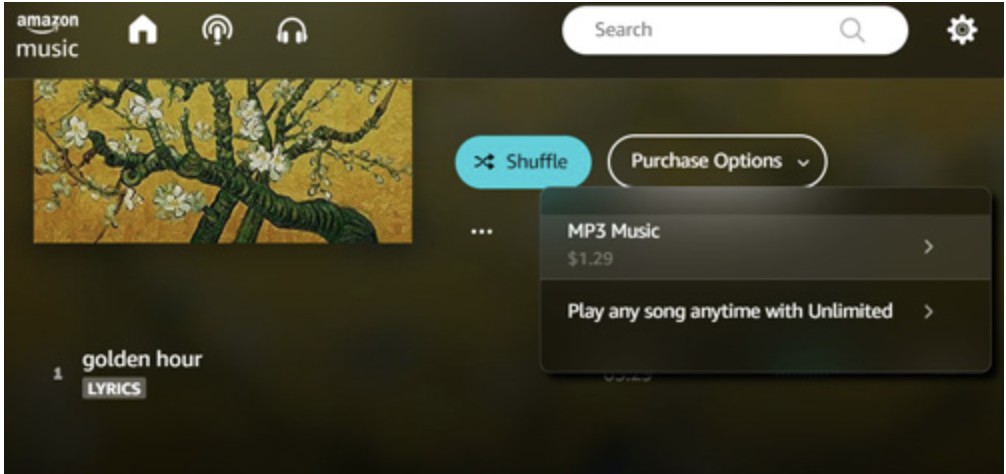
- Step 1: Navigate to the official Amazon page and click on the “All” list. From here, you can choose “Digital Music” from the options available at the top search bar to search for your favourite songs. Once you have found your music, click on its cover art, then select “Purchase Options,” and finally, “MP3 Music.” Doing this can help you purchase the playlist or track.
- Step 2: Click on “Library” followed by “Music” appearing at the top navigation bar. You can find these options both on the Amazon Music app and the web player.
- Step 3: Hit on “Songs” and select “Purchased” from the filter segment.
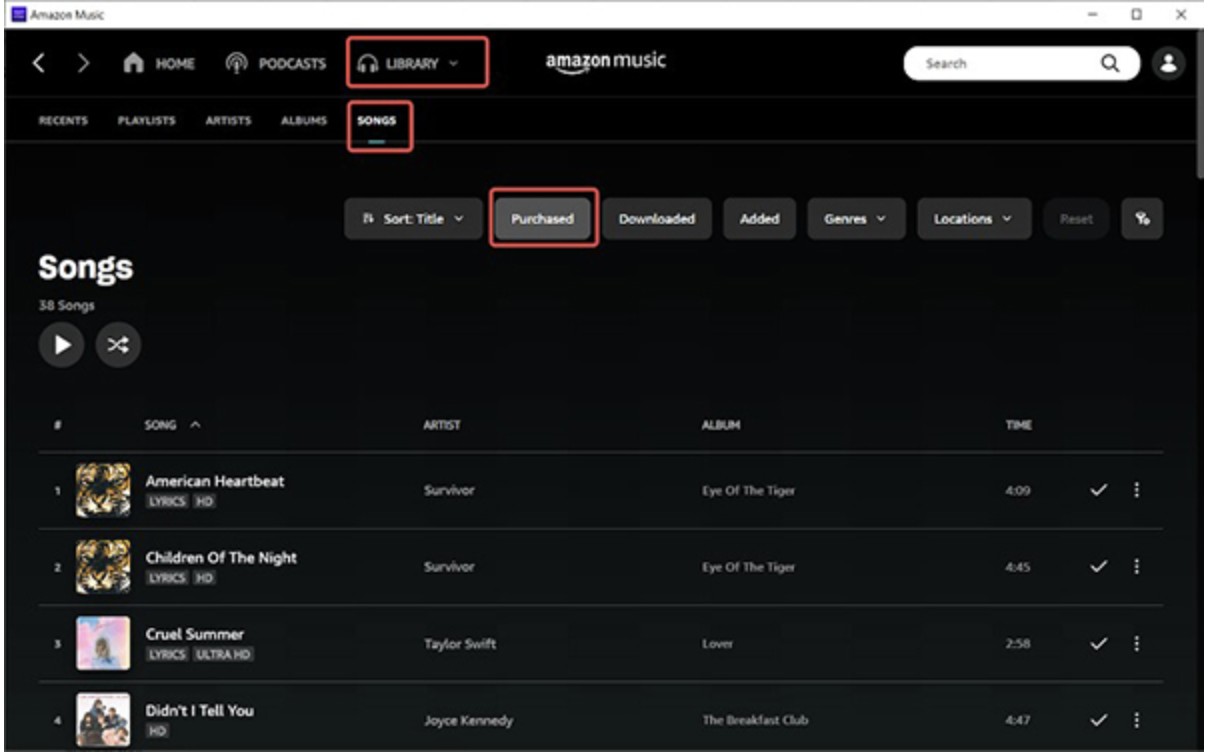
- Step 4: In the fourth step, hit the Download button appearing on the right side of the album or song you wish to download.
- Step 5: On completion of the download, you will find your favourite tracks in the music library of your device to enjoy Amazon Music offline mode.
Shortcomings Of This Method
- The downloaded music won’t be available anymore on your system if the tracks are removed from Prime Music for any reason.
- The downloaded music cannot be converted to MP3 or other file formats.
How To Play Amazon Music Offline With Amazon Music Unlimited
Best For: All Amazon Music subscribers aiming to enjoy Amazon Music offline mode without any additional expense.
Detailed Guide On Using Amazon Music Offline With Purchased Amazon Music
- Step 1: Launch the Amazon Music app and sign in with the credentials of your Amazon Music Unlimited account.
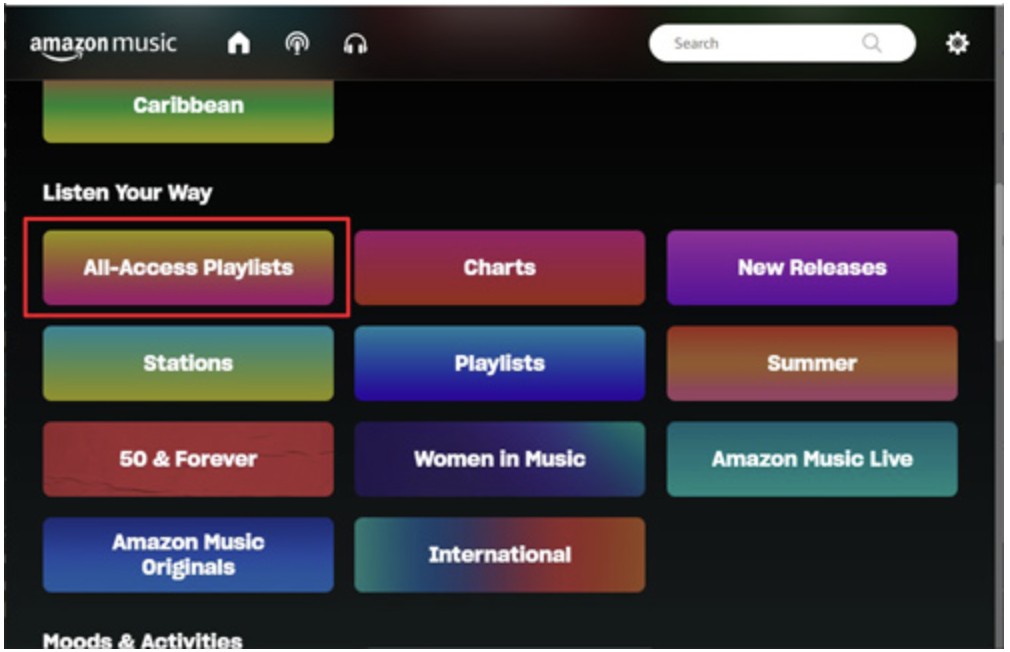
- Step 2: Search for the music you wish to download.
- Step 3: On finding your desired track or album, hit the “More Options” tab. From here, you can select “Download” which resembles a downward arrow. Your chosen music will start downloading automatically.
Shortcomings Of This Method
- High-grade audio can consume a significant amount of storage space on your device.
- All tracks downloaded using Amazon Music Unlimited come with DRM protection, which limits their usage outside the app.
Listening To Amazon Music Offline On iPhone
Best for: iPhone users who want Amazon Music offline.
In-Depth Tutorial On How To Listen To Amazon Music Offline On iPhone
- Step 1: Launch the Amazon Music app on your iPhone.
- Step 2: Click on the gear icon appearing in the top right corner. Head out to the Settings interface, and you can choose to either listen to your favourite tracks online or offline. Select offline mode and determine the quality of your downloaded playlist.
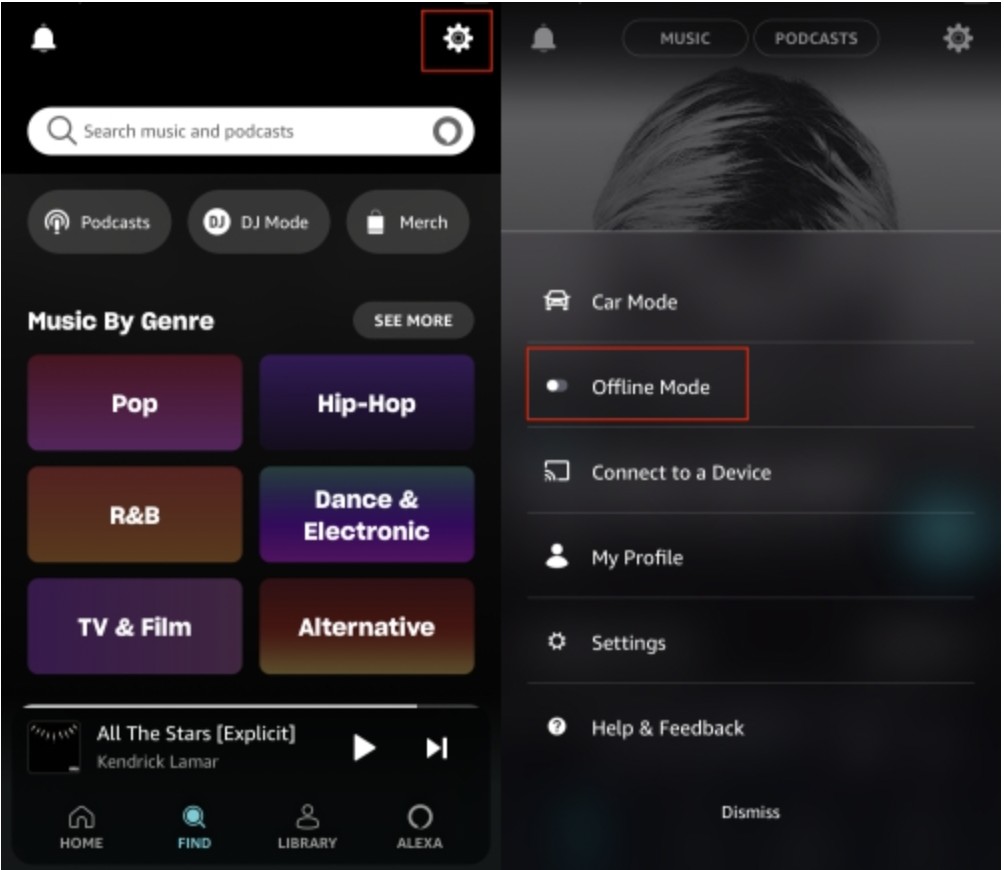
- Step 3: Click on "Offline Mode" from the new menu, and you will be presented with all the downloaded songs under the "Library" tab. Now you can choose any song and enjoy it offline.
Shortcomings Of This Method
- The downloaded files cannot be enjoyed on any external device.
- Often, users complain about the bulky file sizes associated with downloading high-quality audio.
Listening To Amazon Music Offline On Your Android Device
Best For: Android users who want to listen to Amazon Music tracks on their Android device.
Detailed Tutorial On How To Listen To Amazon Music Offline On Android
Offline listening is supported in the Amazon Music app on Android, but what you can download depends on your plan.
Prime members can download All-Access Playlists for offline playback, while Amazon Music Unlimited/Standard can download songs, albums, and playlists for offline listening inside the app. Use the Download button on a playlist/album detail page (or the overflow menu for a song), then switch to Offline Mode or filter your Library to Downloaded content.
Using MusicFab Amazon Converter To Enjoy Amazon Music Offline
Best For: Users who wish to enjoy Amazon Music offline with maximum customization in terms of quality and export format.
Ratings: 4.5 out of 5 stars
How To Listen To Amazon Music Offline Using MusicFab Amazon Converter
- Step 1: Launch MusicFab Amazon Converter on your device and go to its main interface.
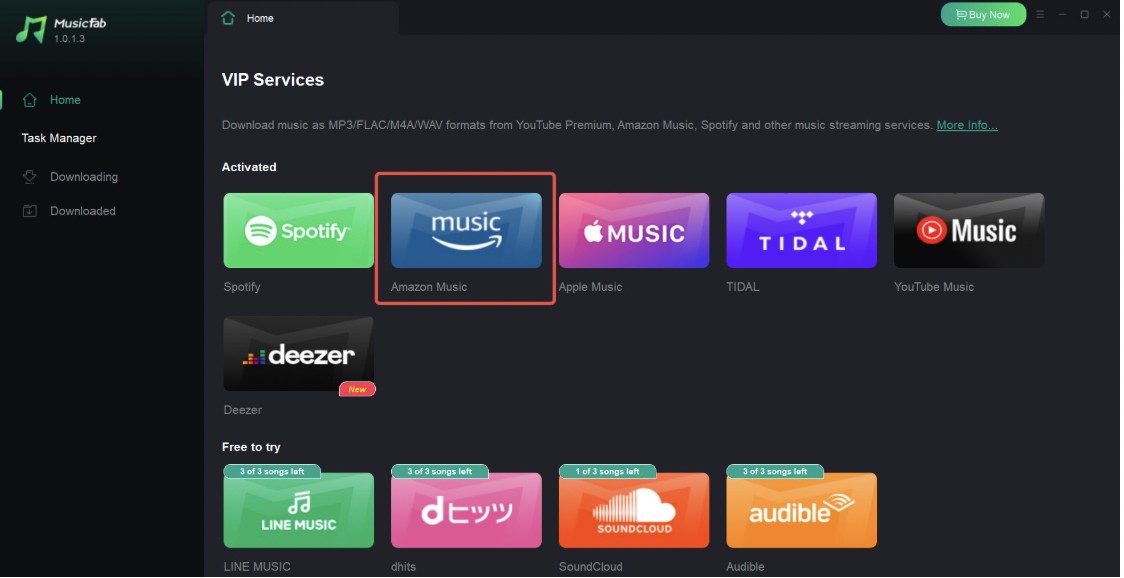
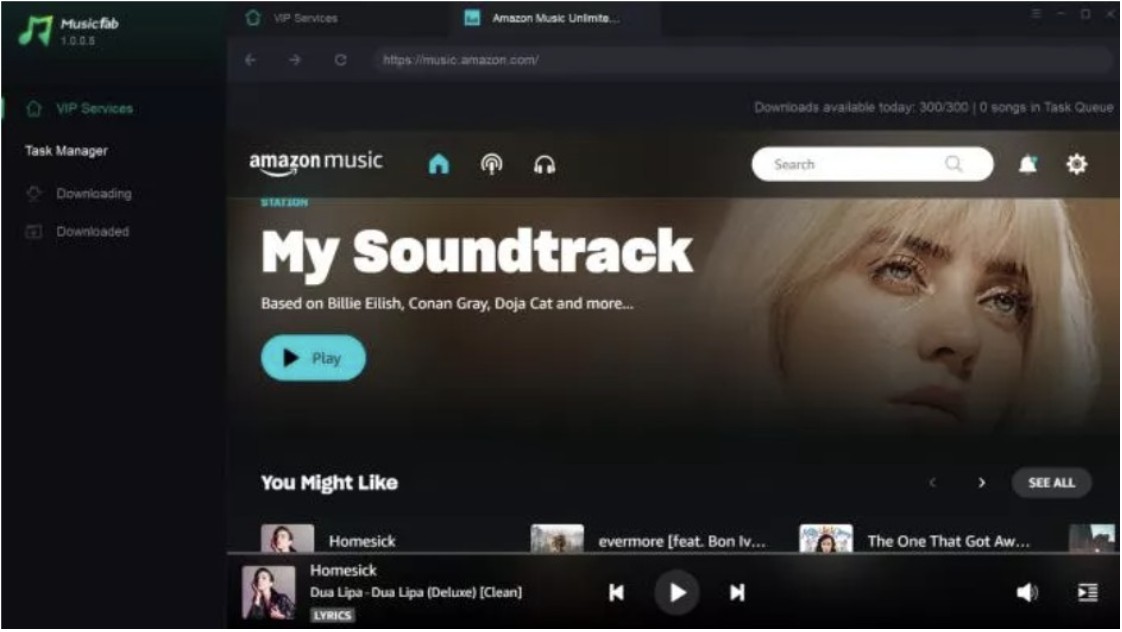
- Step 2: Log in to the Amazon Music app in the second step. To do this, you will need to type in your credentials. Next, you can search for your favourite tracks using the built-in browser.
- Step 3: After choosing the track, a panel will appear. From here, you can determine the audio quality and output format.
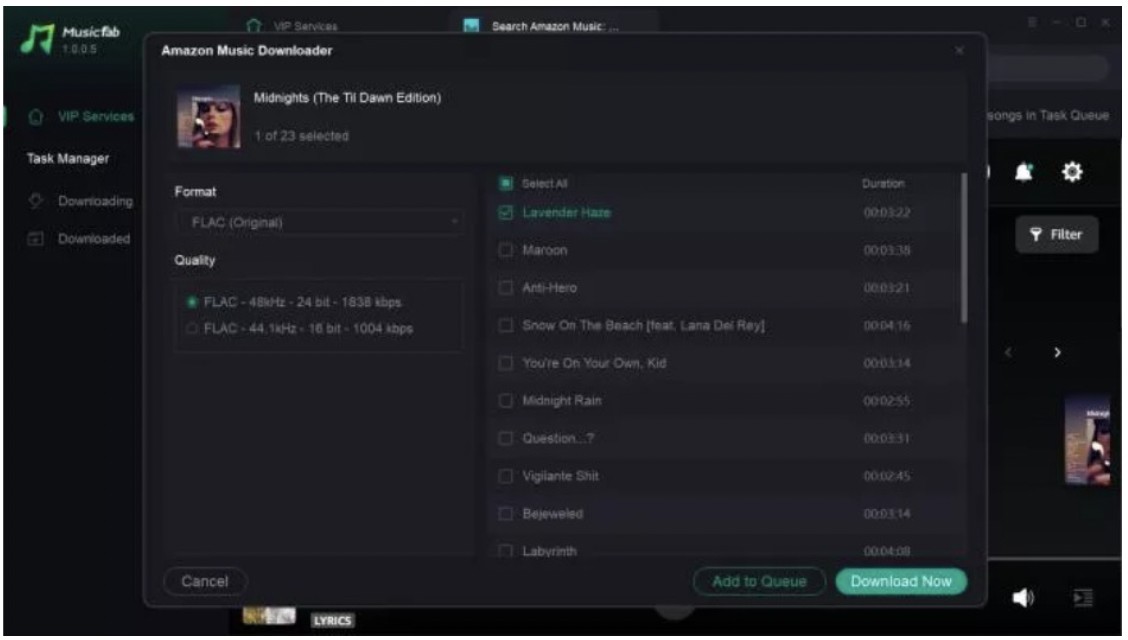
- Step 4: On completion of all customizations, click on “Download Now” button to initiate the process.
Comparison Overview of Downloading Methods
| Method | Purchased Amazon Music | Amazon Music Unlimited | Amazon Music Offline On iPhone | Amazon Music Offline On Your Android Device | MusicFab Amazon Converter |
|---|---|---|---|---|---|
| Supported Operating System | iPhone | Android | Windows, macOS | ||
| Output Format | MP3 | MP3, FLAC, AAC, WAV, OGG, and ALAC | Encrypted Format | Encrypted Format | MP3,FLACWAV, M4A and more |
| Download Speed | High | High | High | High | Very High (20x Speed) |
| Preserve ID3 Tags | Yes | Yen | Yes | Yes | Yes |
FAQs
Yes, you can use Amazon Music on as many devices as you wish. However, you will need to log in to each device using your account credentials.
Subscription downloads are DRM-protected and playable only in the Amazon Music app. Download limits, device authorization, and availability can vary by plan, region, and app version, so treat storage as only one factor, not the only limit.

![10 Best YouTube to WAV Converters 2025 [Safe & Fast]](https://c.musicfab.org/uploads/images/2024-07/17206996344468865-25133daf28c92d3ac9abe86a67fddcf8.)
