

This comprehensive guide will unravel the mysteries behind why your Spotify offline mode isn't functioning as expected.
You are a Spotify Premium user, and you have done everything perfectly. You have downloaded your favourite tracks, arranged the playlist, and have even planned it perfectly. And then, you turn off the internet and proudly turn on the Spotify offline mode.
And then, you realise Spotify is not working offline. Nothing can be more frustrating than that. A profound sense of frustration washes over you as the question echoes in your mind: 'why is my Spotify Premium not working offline?'
Spotify offline not working – Common causes and solutions!
When you find your Spotify offline mode not working, it is never an isolated problem that can be solved right away. It is a result of several overlooked settings or technical issues. We will try out the different options and methods that help you get your Spotify offline downloads working.
1. The 30-day re-authentication
This is the most common issue that you are most likely to ignore or overlook. Many Premium users assume that once they download the songs, they will be available permanently. Spotify needs you to authenticate your downloads quite often.
Spotify operates on a licensing model. Even with a premium subscription, you need to connect to the internet once every 30 days. This check-in will ensure that your subscription status is verified, your licenses are refreshed, and your account stays in good standing.
If you skip this mandatory verification, your offline content will no longer be playable. You can set a reminder for a regular check-in so that you do not forget it, and thus you do not lose Spotify offline mode functionality.
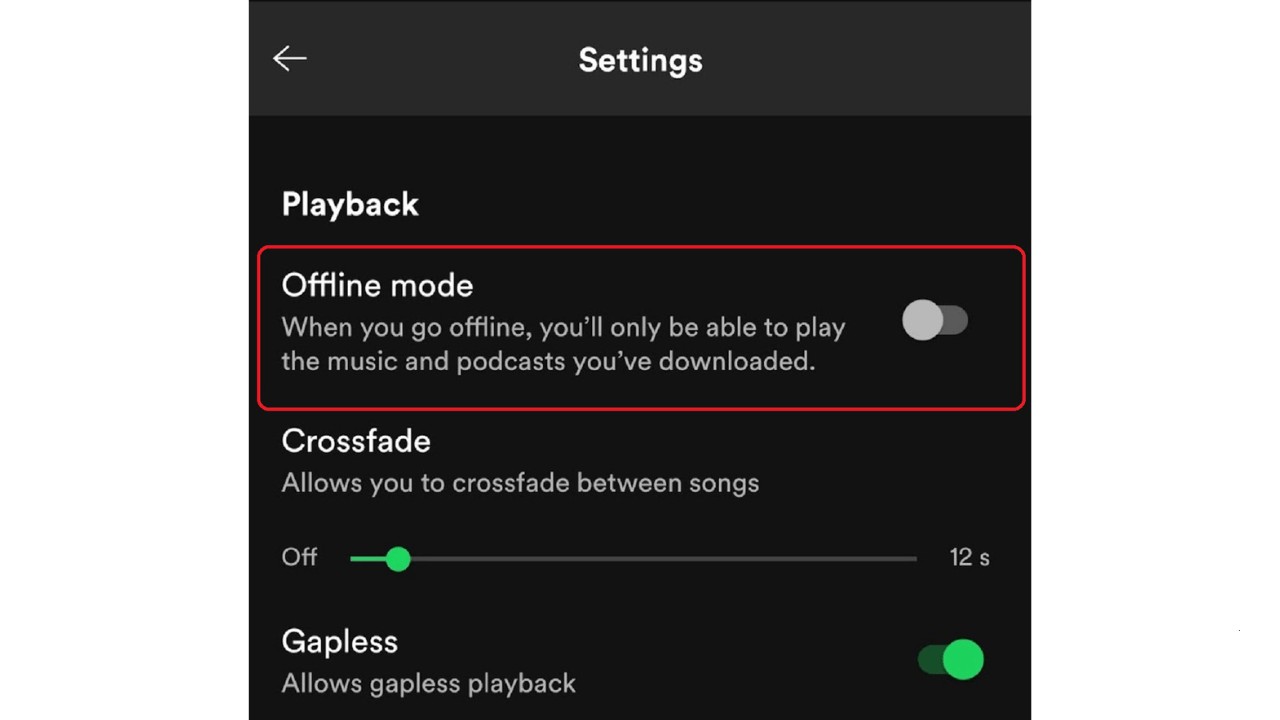
2. Offline mode might be toggled off.
There are instances when the Spotify offline mode is not turned off properly. Make sure that the offline mode is properly and explicitly turned on. It is essential to ensure that the offline mode is explicitly turned on.
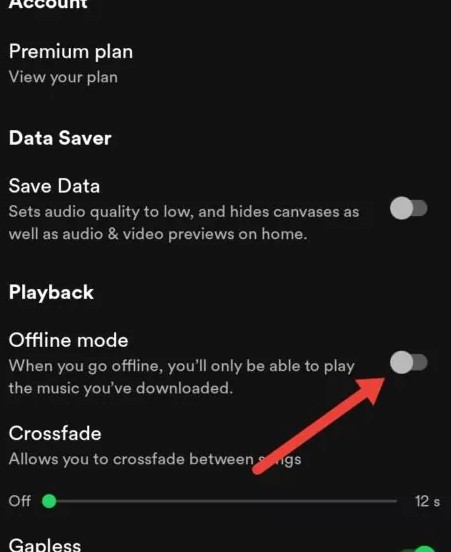
Here is how you can turn on Offline mode on your device:
On your mobile device
- Open the Spotify app.
- Tap your profile icon (usually top-left corner).
- Navigate to Settings and Privacy.
- Scroll down and look for Data Saver (or similar wording like 'Data-saving and offline', depending on your app version).
- Ensure the "Offline Mode" toggle is enabled. It should turn green or blue.
On your desktop
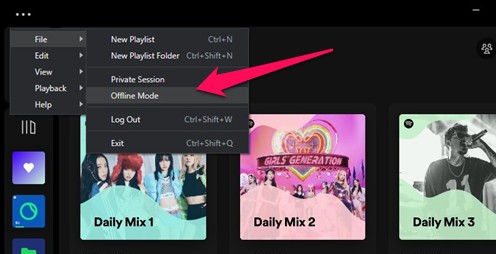
- Open the Spotify desktop app.
- Click on the three dots (ellipsis) icon in the top-left corner of the menu bar.
- Navigate to File.
- Select "Offline Mode" from the dropdown menu. A checkmark should appear next to it.
Important Note: Remember to disable Offline Mode when you reconnect to the internet. This allows the app to access new content, update your library, and stream music that isn't downloaded.
3. Corrupted Cache and Data Inconsistencies
This is another prime cause that can result in Spotify Premium not working offline. Even when you may find the songs are downloaded on your Spotify app, they may have a few cache-related issues.
Any corrupted cache file may end up preventing your app from playing the offline songs. You may find the greyed-out songs or tracks that simply won't start playback. This is typically because of the corrupted cache files.
The Spotify app stores temporary files and data in its cache to speed up performance. Over time, this cache can become bloated or corrupted, leading to playback errors for both streamed and downloaded content.
You can follow the steps below:
- Open the Spotify app.
- Tap your profile icon (top-left).
- Go to Settings and Privacy.
- Scroll down to Storage (on iOS) or Data Saver & offline > Storage (on Android).
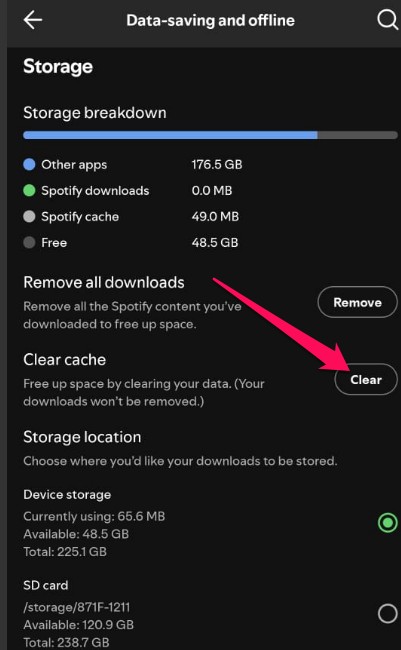
- Tap "Clear cache" and confirm.
If this does not solve the issues for you, and you still have issues playing the downloaded songs or playlists, you can redownload them.
4. Subscription Status and Account Issues
The 30-day check-in period, as outlined above, is crucial for your offline playback. But you need to have your Premium subscription active. If "why is my Spotify premium not working offline" is your question, a lapsed subscription is a strong possibility.
Suppose your subscription recently lapsed (e.g., due to a failed payment, expired card, or cancellation). In that case, even if you downloaded the content months ago, the files become inaccessible because the licensing is no longer valid.
5. Device storage
While downloads might have succeeded initially, a critically low amount of free storage on your device can hinder Spotify's ability to read and play those downloaded files in offline mode efficiently. The app needs some buffer space to function correctly.
Even if songs are downloaded previously, continuous use of your device (taking photos, downloading other apps) can quickly fill up storage. When space becomes critically low, it can hinder Spotify's ability to efficiently read and process its existing downloaded files, leading to stuttering, crashes, or outright failure to play when offline.
You can check the following steps to analyse the device storage:
- iOS (iPhone/iPad): Go to Settings > General > iPhone Storage.
- Android: Go to Settings > Storage.
- Desktop (Windows/Mac): Check your main drive's properties to see available free space.
If you are low on storage, you can regain your storage through the tips below:
- Delete old photos/videos or move them to cloud storage.
- Uninstall unused apps.
- Consider deleting old Spotify playlists you no longer listen to offline, then re-downloading only the essentials.
6. App and operating system issues
Outdated software can make Spotify offline not work. This can happen due to an older version of Spotify app or your operating system.
Ensure your Spotify app is completely up-to-date. Developers frequently release updates that include crucial bug fixes, performance improvements, and compatibility enhancements that directly address offline playback stability and prevent 'Spotify not working offline' errors.
Similarly, keep your phone's (iOS/Android) or computer's (macOS/Windows) operating system updated to the latest stable version. An older OS can create compatibility conflicts that prevent apps from functioning correctly, especially when accessing local files for offline playback.
If your device and operating system are up-to-date, restarting your device can be a good choice. The universal fix for minor software glitches: a simple restart of the Spotify app, or even your entire device (phone, tablet, computer), can often clear temporary system bugs that interfere with any app's performance, including offline playback.
7. Device-Specific Offline Playback Nuances
There can be a few device-specific issues that can result in issues with Spotify offline playback.
iPhone/iPad
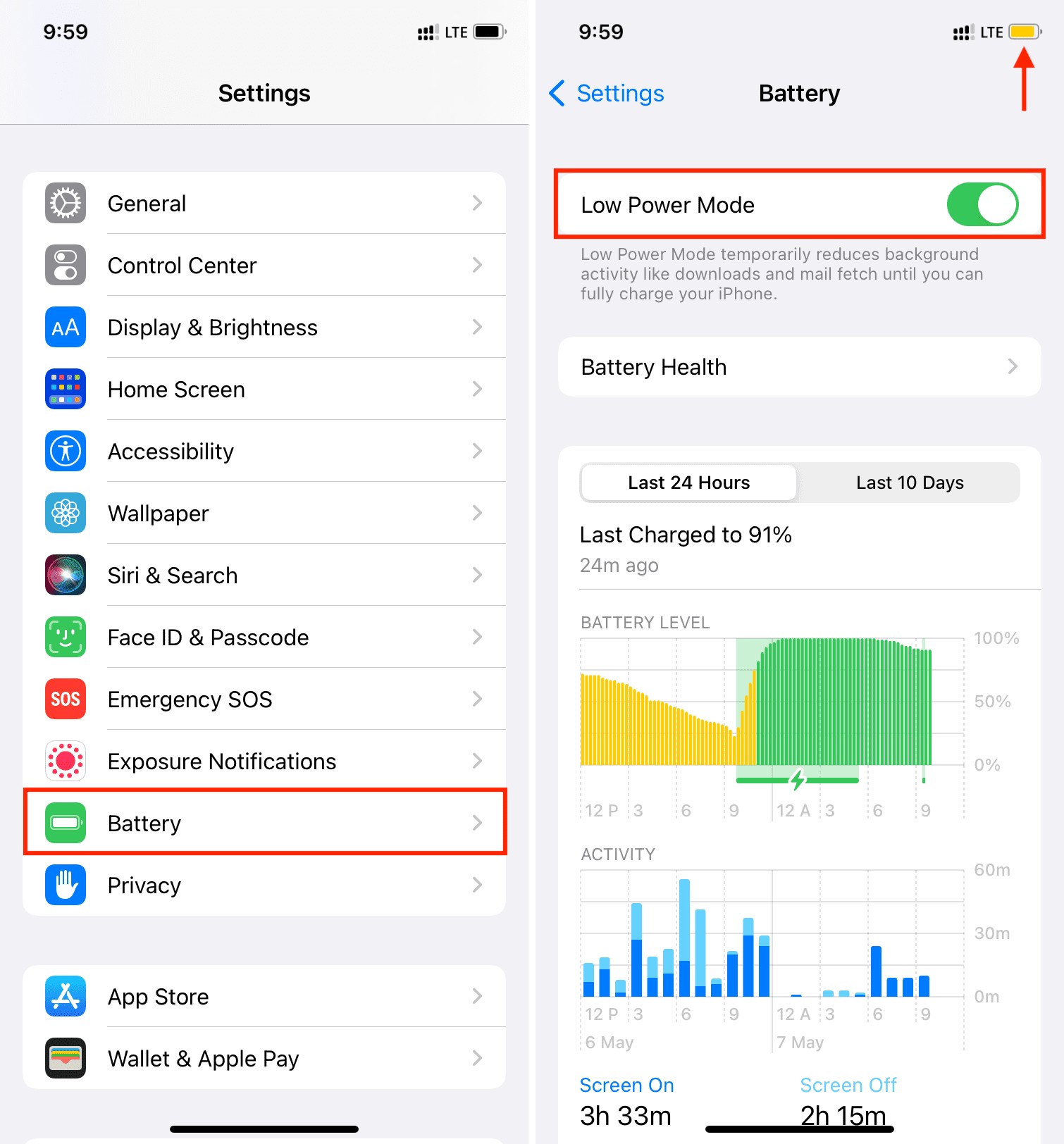
- Low Power Mode: Make sure that Low Power Mode is disabled. Of course, it conserves battery. But, this feature can restrict background app activity and sometimes interfere with Spotify's ability to access and play its downloaded files efficiently. Temporarily disable it while troubleshooting.
- Background App Refresh: While offline, this isn't strictly necessary for playback. But ensuring it's enabled for Spotify when online can prevent issues arising from iOS aggressively 'sleeping' the app, which might affect its ability to maintain its state for seamless offline transitions.
Android
- Battery Optimization: Check your Android device's battery optimization settings. You can find them under Battery or Apps settings. Some Android versions can be overly aggressive in optimizing battery use, potentially suspending Spotify's background processes even when it's just playing locally. Add Spotify to the 'not optimized' or 'unrestricted' list to ensure it runs freely.
- Permissions: Ensure Spotify has all necessary storage permissions granted in your device's app settings (Settings > Apps > Spotify > Permissions). Without proper storage access, it can't read your downloaded files.
The table below should give you the features at a glance
| Issue | Explanation | Solution | |
|---|---|---|---|
| 30-Day Re-authentication | |||
| Offline Mode Not Enabled | The app may not be in offline mode. | Enable Offline Mode manually via app settings (on mobile/desktop). | |
| Corrupted Cache | Damaged cache may cause playback issues. | Clear app cache under Storage settings and redownload songs if needed. | |
| Expired Subscription | A lapsed Premium subscription invalidates downloads. | Renew or fix subscription billing issues. | |
| Low Device Storage | Insufficient storage can hinder file reading. | Free up space by deleting unused apps/files; re-download only essential tracks. | |
| Outdated App or OS | Compatibility issues due to outdated software. | Update Spotify app and device OS to the latest version. | |
| Device-Specific Restrictions | Power-saving or permission restrictions on Android/iOS may block playback. | Disable battery optimization, enable background app refresh, and allow full storage permissions. | |
| Permanent Solution Needed | Default downloads are temporary and tied to the app. | Use MusicFab Spotify Converter for permanent offline access in MP3/FLAC and more formats. | |
Best Offline Playback Solution: with MusicFab Spotify Converter
Well, we have gone through the best fixes for troubleshooting Spotify Premium not working offline. But, what if there was a way to bypass all these inconsistencies? Can we achieve true, guaranteed offline playback?
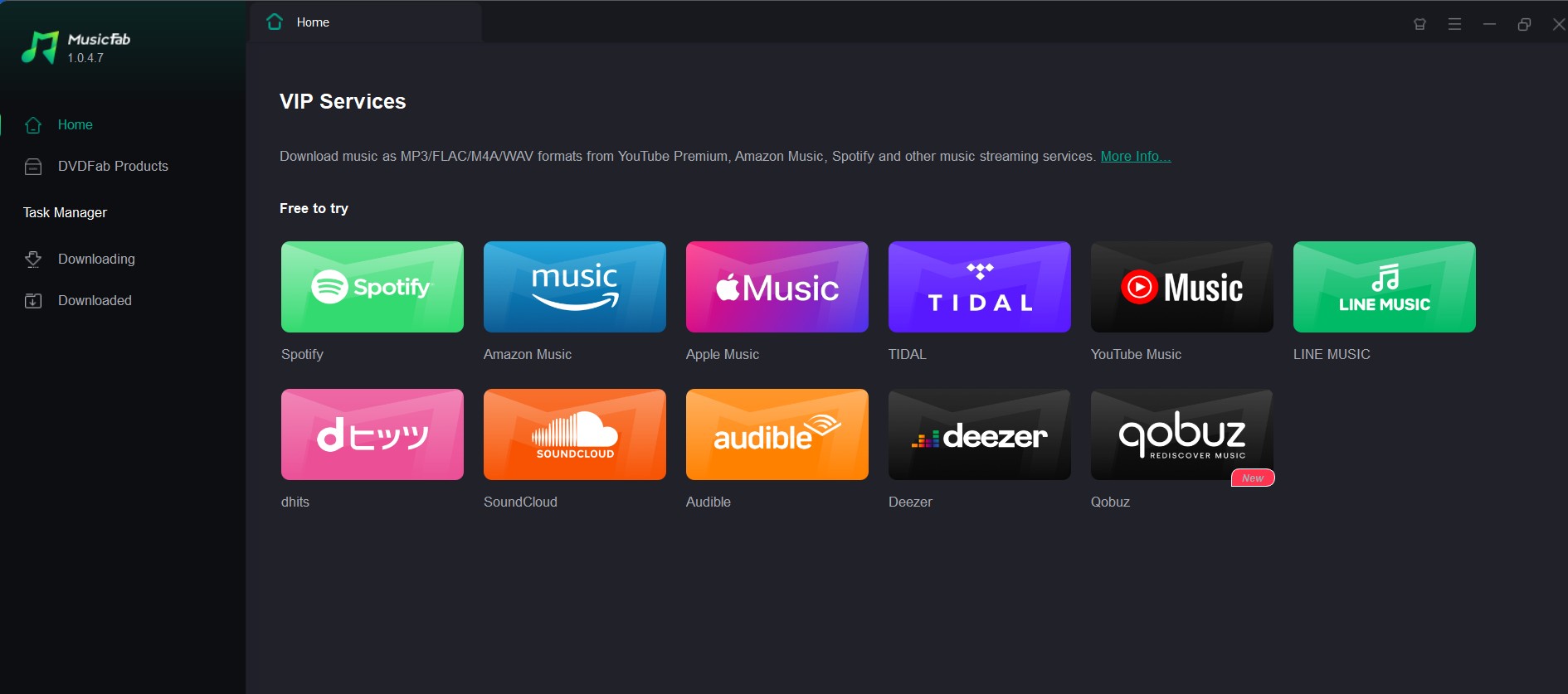
That is where MusicFab Spotify Converter comes into the picture. The default downloads do not let you keep the downloaded files forever. They come with an expiry date. That is why a permanent solution that helps you keep your downloaded files forever is practical. MusicFab Spotify Converter is an excellent tool that lets you handle the task.
The salient features of the tool include
- Uninterrupted offline playback – Listen to your offline songs and playlists as long as you want to. You are no longer dependent on the Spotify app.
- Universal device compatibility – Download your tracks in multiple file formats such as MP3, M4A, FLAC, and AAC, to name a few. This lets you play them on practically any device.
- High fidelity audio – Get studio quality audio at resolutions as high as 320 kbps. You can get lossless downloads for a high-quality audio performance.
- Batch processing – Download multiple audio files in one go. This will help you build a robust playlist.
- ID3 tag preservation – Organise your library with all the ID3 tags. This includes song title, artist, album, genre, year, and even album art.
Conclusion
The frustration of discovering your meticulously downloaded Spotify music won't play when you're offline is a common source of annoyance for Premium users. Understand the crucial 30-day online verification. Also, make sure that Spotify's dedicated 'Offline Mode' is active. You can also clear app caches and optimize device settings. We've covered the essential steps to diagnose and resolve your "Spotify offline mode not working" and "Spotify premium not working offline" issues.
Opt for the comprehensive power and independence offered by MusicFab Spotify Converter. The goal is simple: reliable, uninterrupted access to your beloved music, whenever and wherever you need it. Embrace true offline listening today, and take absolute control of your musical journey!
Disclaimer – Downloading the Spotify tracks and using them only for personal use. This post is for informational purposes.
FAQs
Why do my Spotify downloads disappear after a while?
You must go online at least once every 30 days, and downloads may be removed if you exceed device limits or reinstall the app.

![10 Best YouTube to WAV Converters 2025 [Safe & Fast]](https://c.musicfab.org/uploads/images/2024-07/17206996344468865-25133daf28c92d3ac9abe86a67fddcf8.)
