

Despite the high demand for WAV files, downloading music in this format can be quite challenging. Common questions like: Where can I find WAV downloads? Is it safe and legal to convert music to WAV? What tools can simplify the process? In this article, we has you covered.
WAV files offer lossless sound quality, making them ideal for audiophiles and music professionals alike. More and more people are searching for ways to get their favorite songs in WAV format.
In this comprehensive guide, we’ll walk you through everything you need to know about downloading WAV files quickly and easily. Whether you’re a music producer looking for samples, a podcaster searching for sound effects, or simply need to download audio files for a project, this article will teach you the basics of finding and saving WAV files on your computer.
1. What is WAV?
WAV stands for Waveform Audio File Format. Developed by Microsoft and IBM, it’s one of the most common uncompressed audio file formats. WAV files contain lossless PCM audio data that can be played back on Windows, Mac, Linux, iOS, and Android devices.
The uncompressed nature of WAV files means they can store CD-quality audio without any data loss from compression. This makes them ideal for recording, editing, and sampling audio projects.
2. Where to find WAV files to download?
There are many online resources for downloading WAV files:
- Sample packs - Sites like Splice and Loopmasters host thousands of royalty-free WAV samples for music production. These typically include drums, instruments, vocals, and sound effect samples.
- Acapellas - Acapella websites like Acapellas4u and Looperman provide vocal acapella tracks for remixing. These are usually available to download as WAV files.
- Sound effects - Sites like Freesound, Zapsplat, and 99Sounds offer large libraries of sound effects available to download as WAVs. Useful for video, podcast, game, and audio projects.
- Online audio libraries - Getty Images Audio and Pond5 allow you to search their stock audio libraries and download clips as WAV files.
- Torrent sites - Audio sample packs, acapellas, and sound effect libraries are shared as torrent files, which often contain WAVs available to download.
3. Methods to download WAV files
In this section, we will further discuss different ways to download WAV files for offline playback.
3.1 Using online free downloaders
Free online WAV downloaders change frequently. Limits, availability, and output quality can vary by day or region. Also, converting a stream (e.g., from video sites) to WAV does not make it truly lossless; it only repackages the same audio into a WAV container. If you need real lossless audio, start from a source that provides lossless files (WAV/FLAC/AIFF) officially, then keep the original format for editing or archiving.
Websites like ACETHNIKER and TubeRipper are known for their user-friendly interfaces and reliable conversion process. However, free services always have their limits, for example, you can only download 5 songs each day from Acethinker's free online music downloader. And it doesn't support you to download in batch.
To bypass these limits, a paid desktop music downloader comes in handy. Stay tuned for more details, we will introduce a reliable music downloader software in part 5.
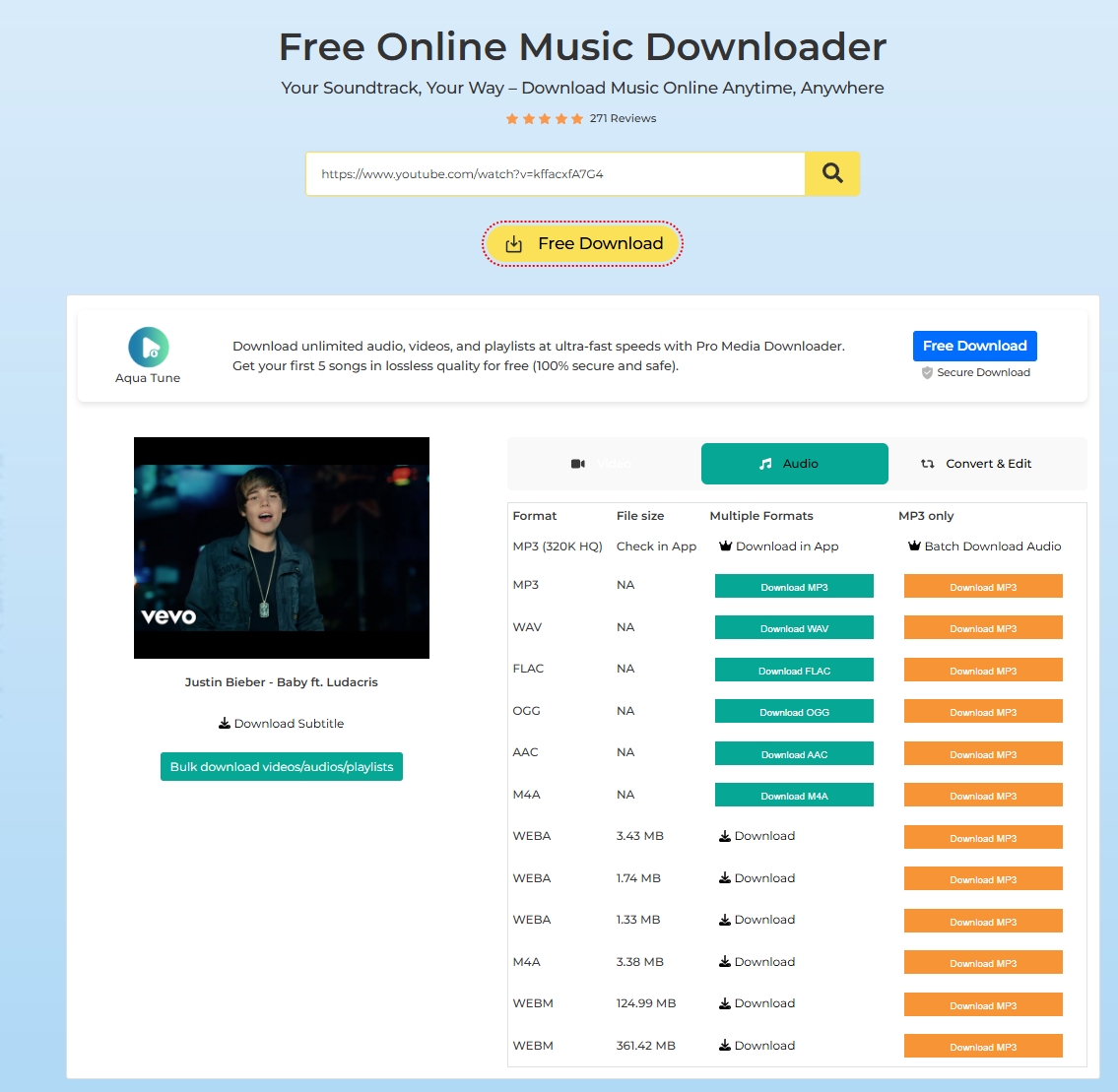
Step-by-step guide to using an online downloader like Acethinker:
3.2 Downloading from music libraries
Many online music libraries offer WAV downloads for a wide range of genres and styles. Platforms like Bandcamp, SoundCloud, and Beatport are popular among artists and producers for distributing their music in high-quality formats like WAV.
related article: Top tools to download SoundCloud music to WAV files.
How to navigate and download from these libraries:
3.3 Direct download from websites
Websites like Freesound and Sample Focus offer a vast collection of royalty-free WAV files that users can download for free.
When you find a WAV file you want to download from a website, here is the typical process:
4. Do music streaming services offer WAV files?
Most major music streaming services like Spotify, Apple Music, and Amazon Music do not offer WAV file streaming or downloads due to the large file sizes.
However, there are some niche streaming services focused on lossless audio that do provide WAV streaming and downloads, such as:
- Tidal - Offers a HiFi tier with lossless CD-quality WAV streaming at 16-bit/44.1 kHz. Users can also download tracks as WAV files.
- Qobuz - Lets users purchase and download albums as WAV files. Streaming is available in lossless quality, including some albums in high-res 24-bit/up to 192kHz WAV.
- HDtracks - Sells high-res music for download in formats like WAV up to 24-bit/192kHz, aimed at audiophiles.
5. How to download music from streaming platforms in WAV?
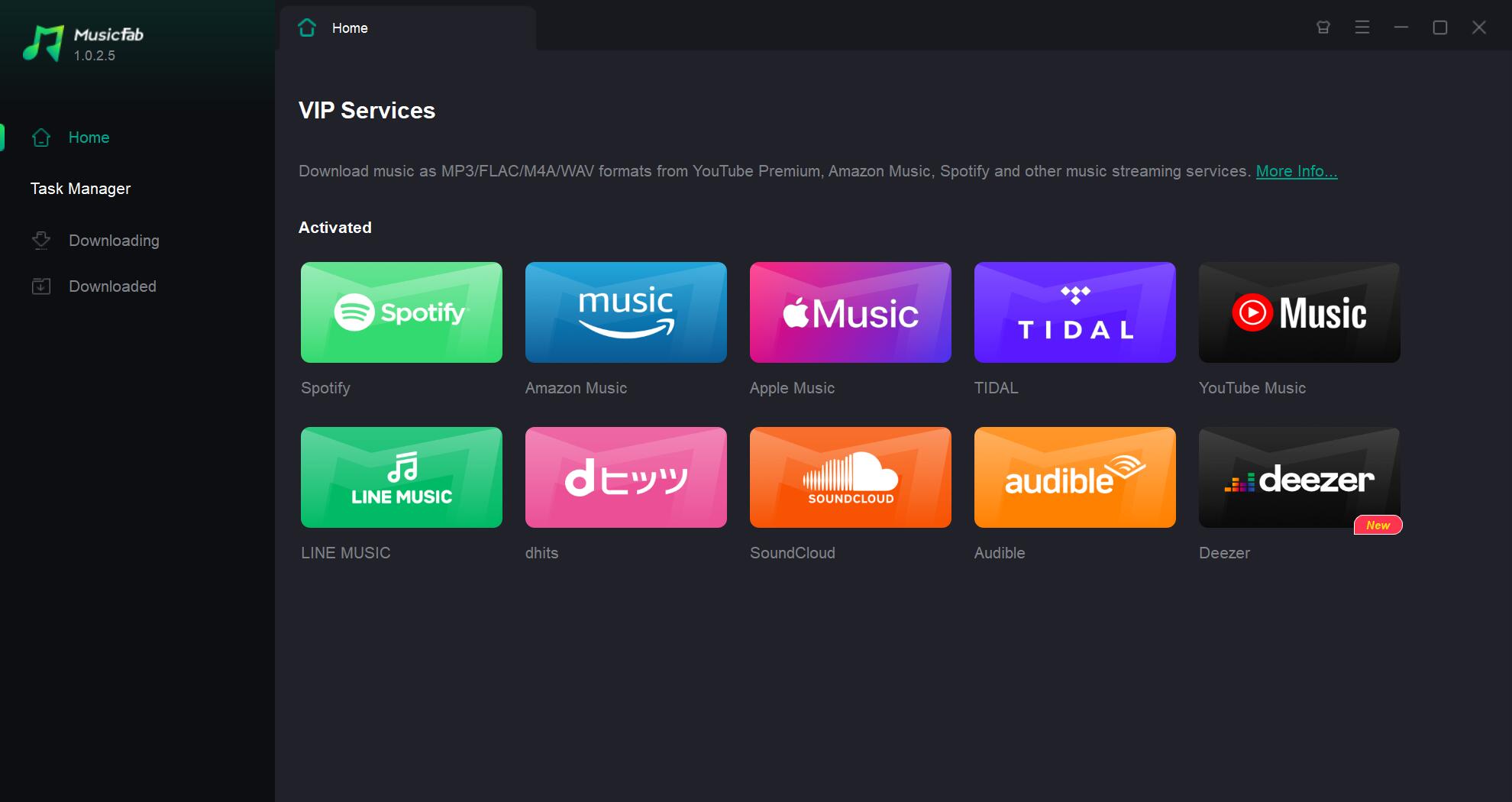
As a sister brand of DVDFab and StreamFab, MusicFab is a popular third-party desktop application that allows users to download music from various online streaming platforms like YouTube Music, Amazon Music, Apple Music, Spotify, SoundCloud, Tidal, and more. It supports you to download songs, albums, playlists, podcasts, audiobooks, or YouTube music videos.
During its free trial, you can get 3-song download opportunity on each platform with no limits.

Your one-stop solution to downloading streaming music offline.
- Download music from Spotify, Amazon Music, YouTube Music, and 10 more.
- Convert music to WAV, MP3, M4A, or OPUS formats.
- An inbuilt web browser to browse, play, and download in one place.
- Download lyrics to sing along with music and keep ID3 tags.
Below are the steps to download WAV files using MusicFab:
Download and install MusicFab
Download and install MusicFab on your computer and open the interface
Choose the music streaming service
From the Home page, find the music streaming website you want, log in to your account.
Search and Customize the output file
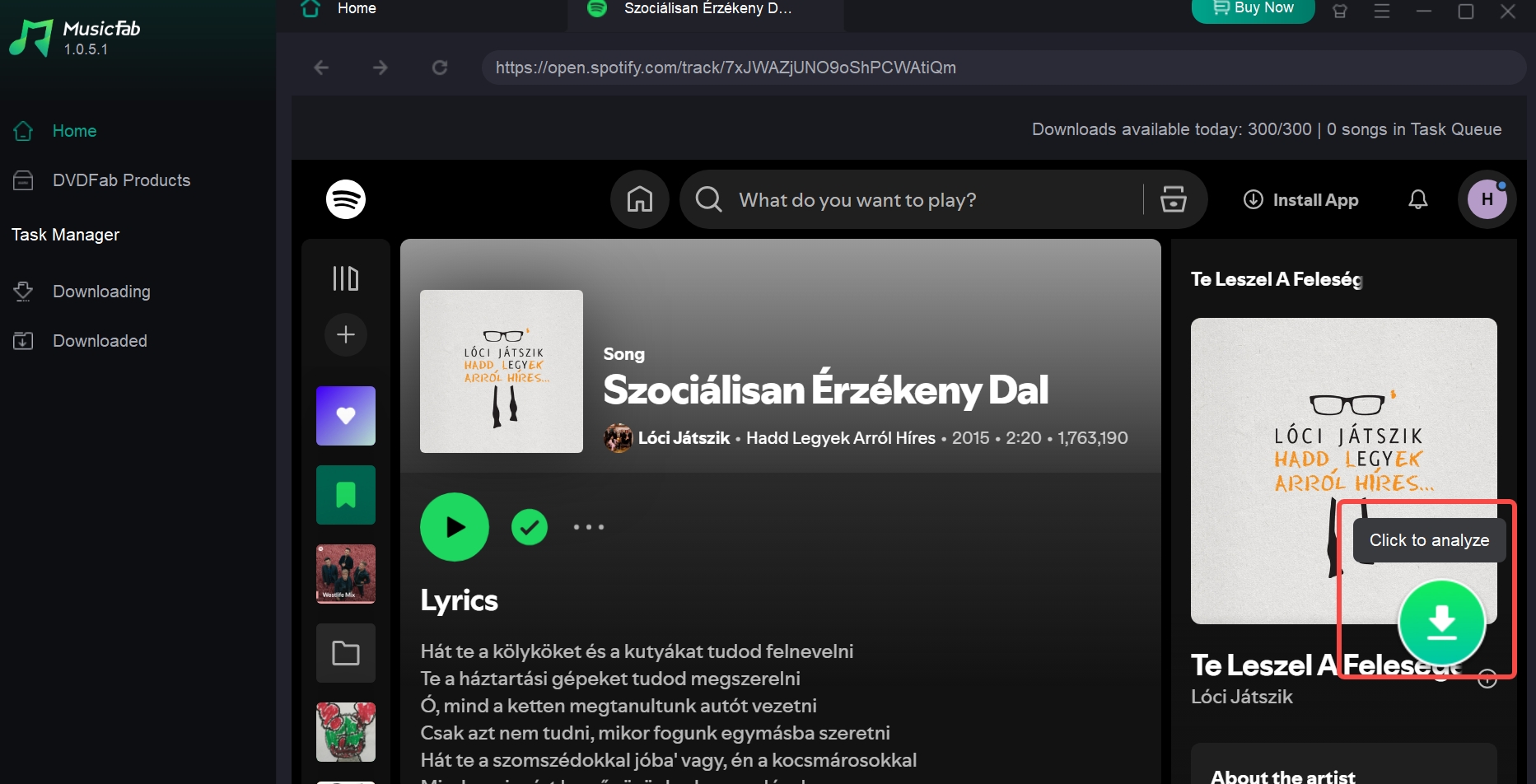
Locate the music you want to download as WAV files. Then click the analyze button in the bottom right corner. MusicFab will automatically analyze it, then a pop-up window will ask for your audio options.
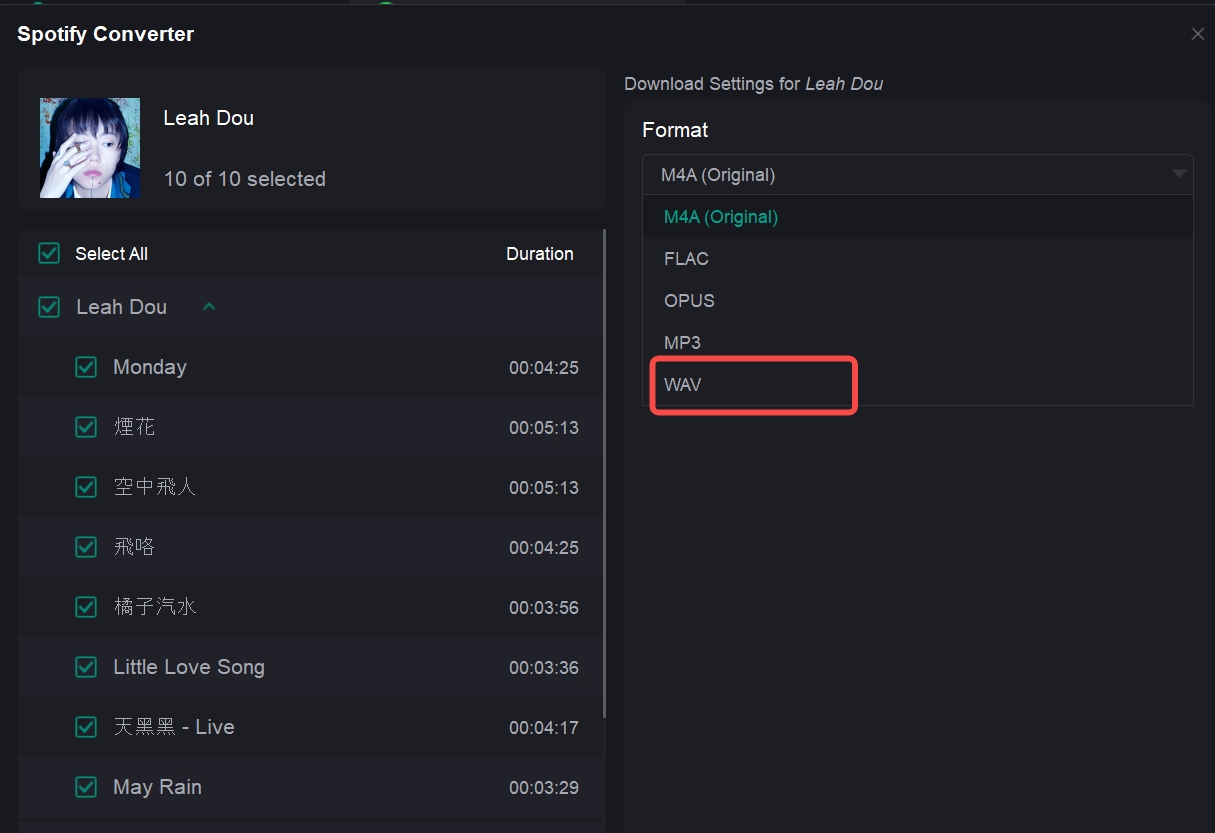
Click the download now button
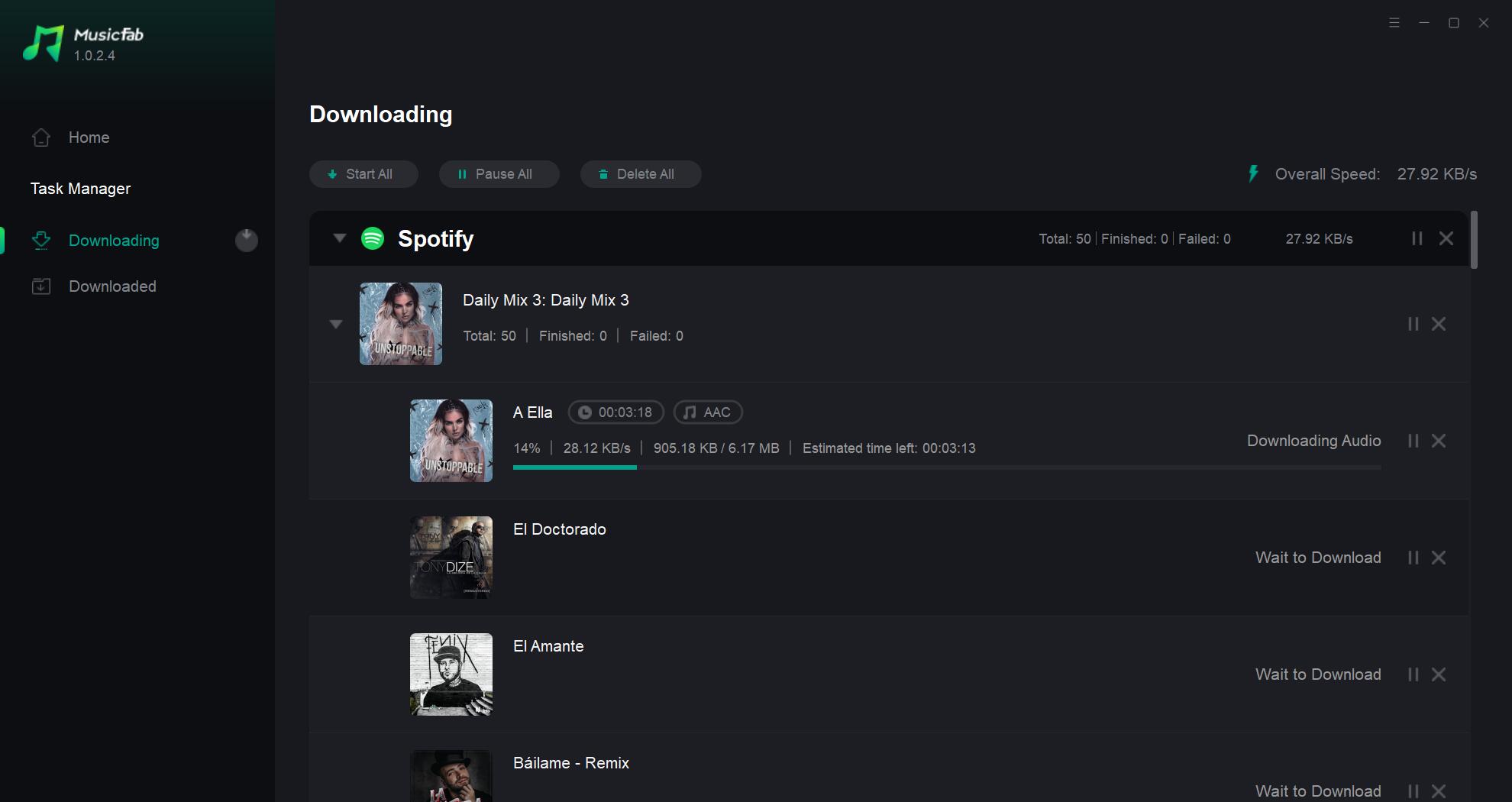
After customization, you can download it right now or add it to the queue. Find the task on the Downloading or Downloaded zone. MusicFab will save your songs at 20X faster speed with the audio track and lyrics.
FAQs
What apps can play WAV files?
WAVs are compatible with most media players and audio editing software like Windows Media Player, iTunes, Audacity, Logic Pro, Ableton, and more.
ADo I need special software to download WAV files?
No, you can download WAV files using any modern internet browser like Chrome, Firefox, Safari, etc. The files can then be played using media players on your computer.
AHow big are WAV files compared to MP3s?
WAV files are significantly larger because they are uncompressed. A 3-minute WAV can be 30-50MB. The same MP3 would be around 3-5MB.
ACan I download WAV files on my phone?
Yes, you can download WAV files directly on iOS and Android devices using the browser or apps like Dropbox. You can also transfer WAV files from your computer.
AWhat bit depth/sample rate should I use for WAV files?
For studio quality, 16-bit depth and 44.1kHz sample rate is recommended. Higher resolutions like 24-bit/96kHz can be used for processing headroom.
ACan I convert MP3 files to WAV?
Yes, you can use free audio converter software like Audacity to convert MP3 files to the lossless WAV format. This will result in larger file sizes.
AFinal wrap-up
With this guide, you now understand the basics of downloading WAV files from websites, YouTube, and other sources.
Remember to always check the usage licenses, organize your downloaded files properly, and use the right settings for audio quality.
Whether you're crafting music, sound effects, podcasts, or videos, integrating WAV files will help take your productions to the next level.

![10 Best YouTube to WAV Converters 2025 [Safe & Fast]](https://c.musicfab.org/uploads/images/2024-07/17206996344468865-25133daf28c92d3ac9abe86a67fddcf8.)
