
MusicFab Amazon Music Converter

1. Convert any songs from Amazon music to various formats, such as MP3, FLAC;
2. Save converted Amazon music to your local file and enjoy it without buffering;
3. Preserve ID3 tags after conversion, including titles, album, cover, and more

Free Download

100% Safe & Clean

How to Download the Amazon Music Audio for Offline Listening

Discover how to maximize your Amazon Music experience with this comprehensive guide! From downloading the app on various devices to converting Amazon tracks into MP3 format, unlock all the tips, tools, and FAQs you need to enjoy high-quality audio streaming seamlessly.

In this guide, we'll walk you through step-by-step instructions on how to download songs from Amazon Music using third-party apps and official ways. 

Can you download music from Amazon Music directly?

Well, yes. Amazon Music offers you access to offline download options for premium users. However, the download option is available only with restrictions, and that is why you may want to look for alternative options.

However, the default download option also comes with a few limitations.

The songs, podcasts, and other content that you download from Amazon Prime come with DRM protection. That would mean you cannot access the downloaded titles only on the app. It is not possible to transfer the downloaded music to another device and listen to it. Apart, if the downloaded music ceases to be on Prime Music for any reason, it will be removed from your downloads folder as well.

You will not be able to convert the downloaded music into an MP3 file format either. It will be available in a proprietary format that can only be recognized by the app.

what is amazon music

1. How to Download Amazon Music to MP3 and Other Formats

1.1 MusicFab Amazon Music Converter

MusicFab Amazon Music Converter
  • Download music from Amazon Music at 20X faster speed.
  • Convert Amazon Music to MP3/FLAC/WAV/M4A.
  • Preserve Amazon Music with ID3 tags for easy management.
  • Batch download Amazon Music songs, playlists, or albums.
  • Keep the downloads permanently even after users cancel Amazon music subscription.

1.2 How to Download Amazon Music MP3 with MusicFab?

MusicFab Amazon Music Converter is available on both Win and Mac computers. Here we will take the Windows version as an example to show you how to use MusicFab to download Amazon Music songs offline. Please install this program on your computer before starting.

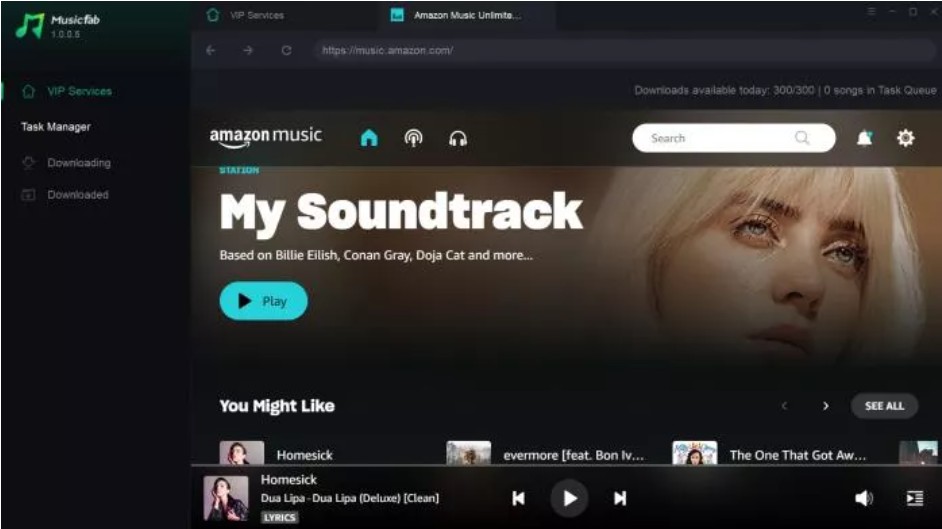
Step1
Start this program and navigate to Amazon Music service on the main interface.

how to download music from amazon music

Step2
Enter your account and password to log in to Amazon Music app. Browse it using the built-in browser to search for a music track.

how to download amazon music mp3

Step3
A panel shall appear when you have the selected track played. From this panel, you can choose the output format and audio quality as needed.

how to download amazon music songs

Step4
When the customization is done, you can tap on the ‘Download Now’ button to start the process which will be finished very soon.

2. How to Download Songs from Amazon Music on PCs and Mobiles [Official Ways]

Installing the Amazon Music app on your device is quick and straightforward. Follow these steps to download and set up the Amazon Music app on Windows PC, Mac, iOS, and Android devices.

2.1 Download Amazon Music App on a Windows PC
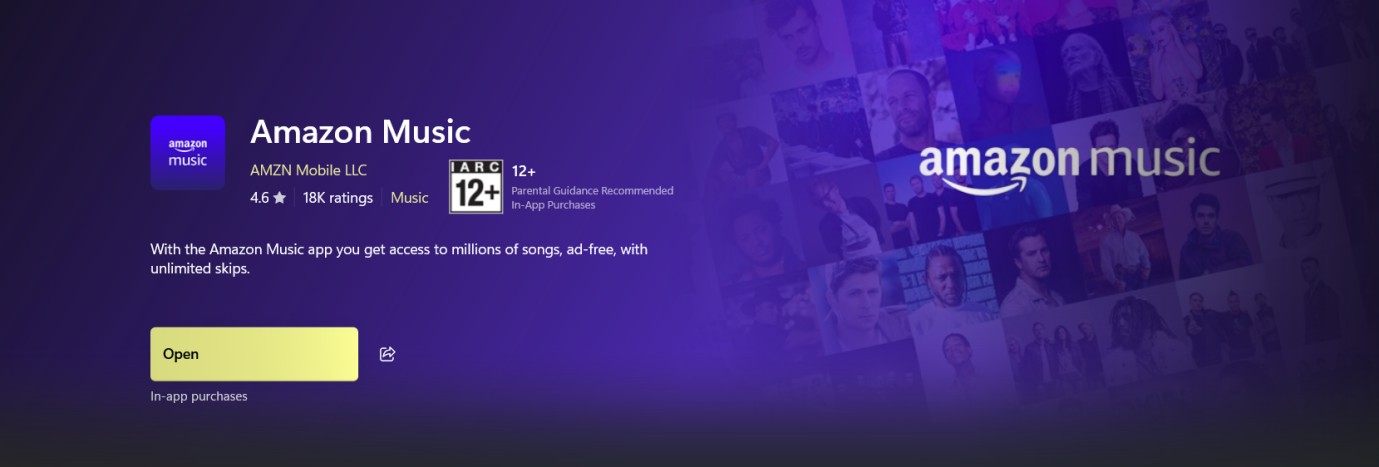
Step1
Go to the Microsoft Store and search for Amazon Music.
Step2
Download the tool and install it on your computer.

amazon music download pc 

Step3
Launch the Amazon Music app and log in with your Prime account.
Step4
Search for the track that you wish to download.
Step5
Open the details page for the song.
Step6
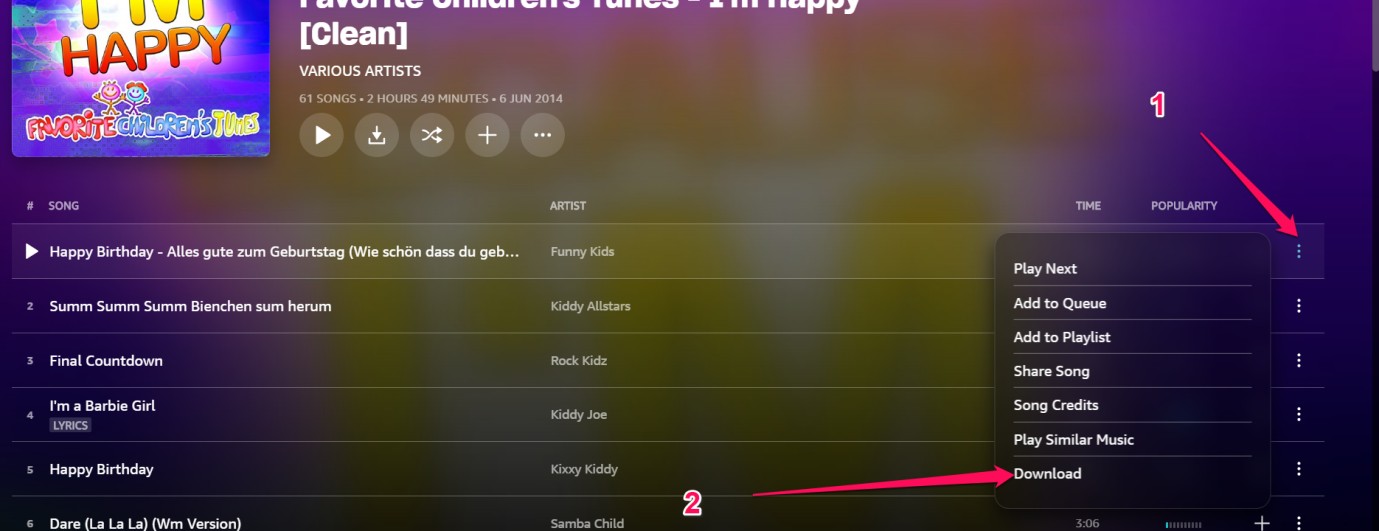
Click on the three dots for the song and choose Download

amazon music download pc

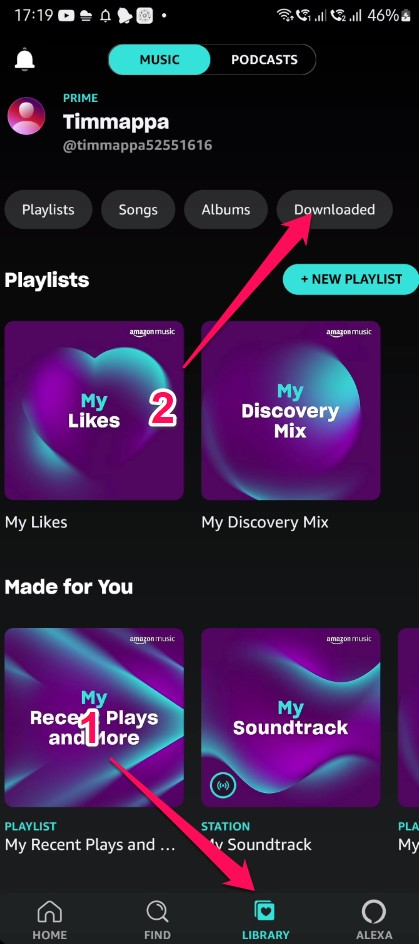
Once downloaded, the track should be available under Library > Music > Downloaded.

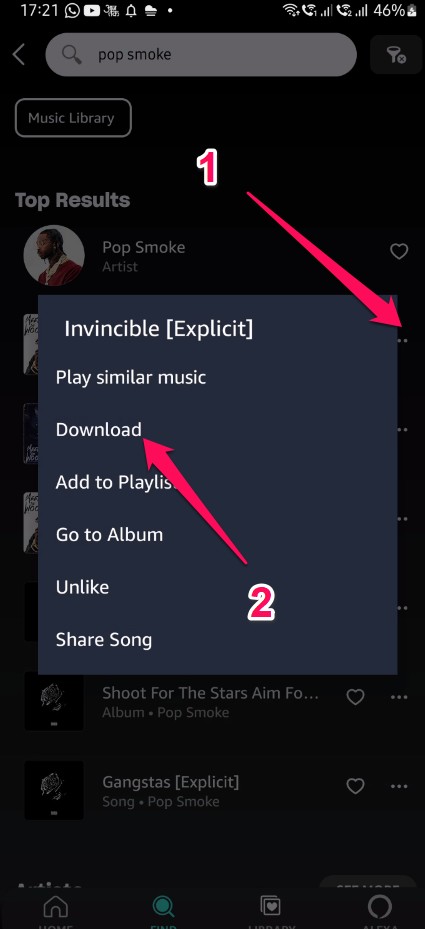
2.2 Download songs from Amazon Music App on Android
Step1
Download Prime Music on your device if it is not installed already.
Step2
Search for the song you wish to download. Click on the three-dot icon just beside the track.
Step3
From the context menu that appears, click on Download.

 click on Download 

Step4
Your track will be downloaded onto your device. You can access it by following the path Library -> Downloaded.

 click on Download


The availability and steps might differ slightly based on your location and the current status of the app in the respective app stores. Make sure to download the official Amazon Music app from trusted sources to ensure your security and the best user experience.

FAQs

Q1. How many songs can I download?

A1. There is no set limit for downloads as long as you have storage available on your device. However, some subscription plans limit how many downloads you can have offline simultaneously.

Q2. Can I use the app on multiple devices?

A2. Yes! Download Amazon Music on as many of your personal devices as you want. Just log into your Amazon account on each device.

Q3. What audio quality does the app use?

A3. Audio quality depends on your plan and the specific track. In Amazon’s terminology, “HD” is typically CD-quality (16-bit/44.1 kHz) and “Ultra HD” can go up to 24-bit with sample rates up to 192 kHz.

Q4. Does the app work offline?

A4. You can use the app offline by downloading songs, playlists or albums to your device storage for playback without an internet connection.

Q5. Can I upload my own music to the app?

A5. Yes, Amazon Music allows you to add up to 100,000 of your own songs to your account by uploading them from your computer. These will appear in “My Music.”

Q6. How do I get help with the app?

A6. Tap on your profile icon, Help & Feedback, and Contact Us to get assistance directly from Amazon's customer support team regarding any issues with the app.

Q7.How to Download Purchased Amazon Music to PC?

A7. If you have purchased a track on Amazon Music, you can look under the Songs or Albums section, and select the Purchased option. Then, click on More and you should find the download option.

Conclusion

Now that you know how to download Amazon Music App on your devices, enjoy its fantastic features, and also how to download Amazon Music to MP3 files. You're all set to dive into a world of music and entertainment tailored just for you!

Whether you're a music enthusiast or someone looking for the perfect soundtrack to accompany your day, Amazon Music has you covered. Start your musical journey today by downloading the app and exploring the extensive library it has to offer.

POPULAR LATEST
MusicFab Review 2026: A Detail Guide for Beginners
10 Best YouTube to WAV Converters 2025 [Safe & Fast]
5 Free&Paid Tools to Convert Amazon Music to MP3 2025
Top 8 Online SoundCloud to MP3 Converters 2025 [Free & Paid]
2025's Proven Top Spotify Downloaders for PC [Win & Mac]
2025 Top 15 Online&Desktop Spotify Downloaders [Win & Mac]
2025 Best 8 Free Spotify Playlist Downloaders Online,Desktop,Mobile
7 Tools to Convert Apple Music to MP3 Online & Desktop 2025
Can You Change Spotify Username? How to Do It?
Best Spotify MP3 Converters: Top Picks for Windows, Online, and Mobile
Can You Listen to Audible Offline in 2026? Here’s How it Works!
How to Listen to Pandora Offline (2026): Plus vs Premium, Downloads & Fixes
Can You Listen To Amazon Music Offline?
Sidify Music Converter Review: Is It the Right Choice for You?
Top 7 Tidal Music to MP3 Converters for Windows and Mac Users
Guide to Spotify Offline Mode Not Working & Plus a Permanent Fix!
Youtube Music vs Spotify Sound Quality: Who Wins?
How to Rip Audio from YouTube on Windows & Mac: Fast, Simple
Apowersoft Review (2026): ApowerREC, Online Recorder, Pricing & Best Alternatives
How to Pre-Save on Spotify (2026): Countdown Pages, Links & Tips
2026 ViWizard Spotify Music Converter Review & Alternative
TuneFab Review: Pros, Cons,User FeedBack & Alternative 2026
How to Download SpotifyPodcast to MP3 via 6 Ways 2026
How to Download Amazon Music to Your Phone
How to Download Music in WAV Files?
Learn More Show Less

TRENDING

See More

Try MusicFab for Free

  • Download music/podcasts/audiobooks.
  • Output MP3/M4A/FLAC/WAV/OPUS files.
  • Keep the downloads permanently.
Start My Free Trial

100% Safe & Clean